Introduction
Modern software development relies heavily on collaboration, automation, and continuous delivery. Teams work across different locations, contribute code simultaneously, and release updates frequently. In such dynamic environments, managing changes to code efficiently becomes critical.
This is where version control plays a vital role.
Version control systems allow developers to track changes in code, collaborate with team members, and maintain a complete history of modifications. In DevOps environments, version control is not just a tool—it is the backbone of modern development workflows.
Without version control, teams would struggle to manage multiple versions of applications, track changes, and resolve conflicts between developers.
Understanding version control DevOps practices is essential for anyone working in modern software development.
In this comprehensive guide, you will learn:
- What version control is
- Why version control is essential in DevOps
- Types of version control systems
- How version control works in DevOps pipelines
- Popular version control tools used by DevOps teams
- Best practices for implementing version control
By the end of this article, you will clearly understand how version control enables collaboration, automation, and reliability in DevOps environments.
What is Version Control?
Version control is a system that tracks changes made to files over time.
It allows developers to:
- store multiple versions of code
- track modifications
- revert to previous versions
- collaborate with other developers
A version control system maintains a history of changes, enabling teams to understand who changed what and when.
This is especially important for large development teams working on complex projects.
Example of Version Control in Action
Imagine a team working on a web application.
One developer updates the login system while another works on the payment module.
Version control ensures that both changes can be tracked, reviewed, and merged without overwriting each other's work.
Why Version Control is Important in DevOps
DevOps encourages rapid development, automation, and continuous deployment.
Version control supports these practices in several ways.
Collaboration Across Teams
Version control allows multiple developers to work on the same codebase simultaneously.
Changes can be merged safely without losing work.
Change Tracking
Every change in the codebase is recorded.
Teams can see:
- who made the change
- when it was made
- what was modified
Rollback Capability
If a bug appears in production, developers can quickly revert to a previous stable version.
Automation Integration
Version control integrates directly with CI/CD pipelines.
Code commits can trigger automated builds and tests.
Types of Version Control Systems
There are three main types of version control systems.
Local Version Control
Local version control stores file changes on a single computer.
This approach tracks revisions but does not support team collaboration effectively.
Example:
- simple file version tracking tools
Centralized Version Control
Centralized systems use a single central server to store code repositories.
Developers commit changes to the central repository.
Examples include:
- Subversion
- CVS
While centralized systems improve collaboration, they depend heavily on a central server.
Distributed Version Control
Distributed systems allow every developer to maintain a full copy of the repository.
Developers can work offline and synchronize changes later.
Popular distributed version control systems include:
- Git
- Mercurial
Distributed systems are widely used in modern DevOps environments.
How Version Control Works
Version control systems track changes through commits.
Step 1: Create a Repository
A repository stores project files and their history.
Step 2: Modify Files
Developers edit files in the project.
Step 3: Commit Changes
Changes are recorded with a commit message describing the update.
Step 4: Push Changes
Developers push commits to a shared repository.
Step 5: Merge Changes
Different branches can be merged to combine work from multiple developers.
Version Control in DevOps Pipelines
Version control plays a central role in DevOps pipelines.
Code Repository as the Source of Truth
The repository becomes the central location for application code and configuration.
CI/CD pipelines retrieve code directly from the repository.
Automated Builds
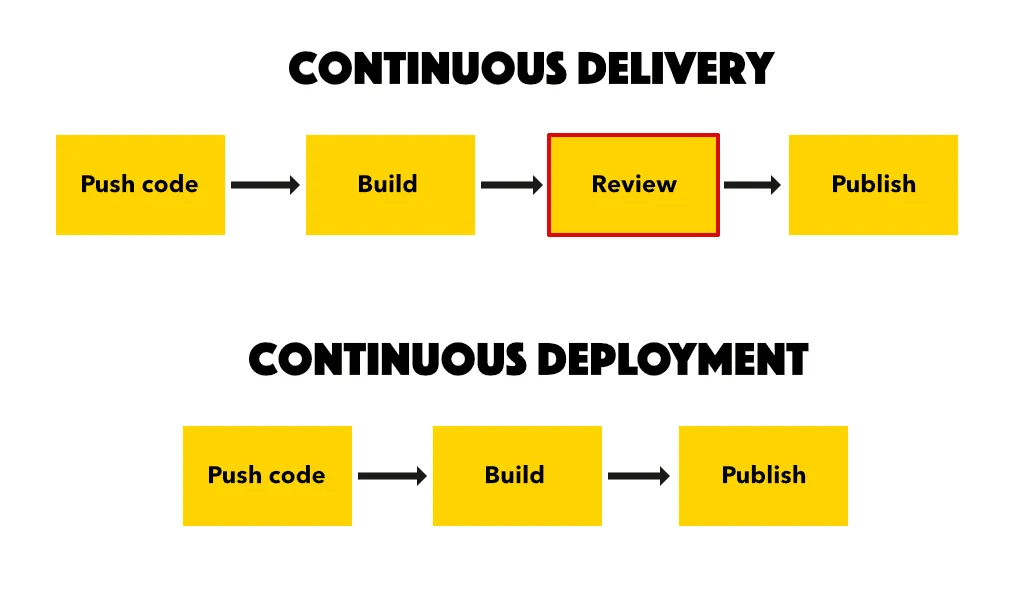
When developers commit code, the CI system automatically builds the application.
Automated Testing
Testing pipelines run automatically to validate code quality.
Continuous Deployment
If tests pass, the application can be deployed automatically.
Version control triggers these automated workflows.
Popular Version Control Tools Used in DevOps
Several tools support version control in DevOps environments.
Git
Git is the most widely used version control system.
It supports distributed development and powerful branching workflows.
Popular Git platforms include:
- GitHub
- GitLab
- Bitbucket
Subversion (SVN)
Subversion is a centralized version control system used by some organizations.
Mercurial
Mercurial is another distributed version control system similar to Git.
Branching Strategies in DevOps
Branching allows developers to create separate versions of code.
Feature Branching
Developers create branches for new features.
These branches are merged after development is complete.
Git Flow
Git Flow uses structured branches such as:
- main
- develop
- feature
- release
This workflow helps manage large projects.
Trunk-Based Development
Developers commit frequently to the main branch.
This approach supports continuous integration.
Best Practices for Version Control in DevOps
Write Clear Commit Messages
Commit messages should describe what changes were made.
Commit Frequently
Small, frequent commits make tracking changes easier.
Use Branching Strategically
Branches help isolate features and prevent conflicts.
Review Code Before Merging
Code reviews improve code quality and catch issues early.
Protect Main Branches
Restrict direct commits to critical branches like main.
Common Challenges with Version Control
Despite its advantages, teams may face challenges when using version control.
Merge Conflicts
When multiple developers modify the same file, conflicts may occur.
Poor Commit Practices
Unclear commit messages make change tracking difficult.
Large Repositories
Large codebases may slow down repository operations.
Version Control vs Backup Systems
Version control is sometimes confused with backup systems.
However, they serve different purposes.
| Version Control | Backup |
|---|---|
| Tracks changes in files | Stores copies of data |
| Supports collaboration | Focuses on data recovery |
| Maintains version history | Stores snapshots |
Version control is specifically designed for software development.
Short Summary
Version control is a critical component of DevOps workflows. It allows teams to track changes, collaborate effectively, and automate development pipelines.
By using distributed systems like Git, DevOps teams can maintain a reliable history of code changes while enabling continuous integration and deployment.
Conclusion
Version control has become an essential foundation of modern software development and DevOps practices. It enables teams to collaborate efficiently, track code changes, and maintain a reliable development history.
By integrating version control with CI/CD pipelines, organizations can automate builds, testing, and deployments while maintaining full visibility into code changes.
For developers and DevOps engineers, mastering version control tools and workflows is a fundamental skill that improves productivity, reliability, and software quality.
As software development continues to evolve, version control will remain a key pillar of DevOps success.
Frequently Asked Questions
Version control in DevOps refers to systems that track changes in code and enable collaborative software development.