(Main Keyword: ci cd in agile)
Introduction: Why CI/CD Is the Heartbeat of Agile Teams
Agile development promises speed, flexibility, and continuous improvement. Teams work in short sprints, release incremental features, gather feedback quickly, and adapt to change. But here’s the real question:
How do Agile teams deliver working software consistently every sprint without breaking production?
The answer lies in ci cd in agile practices.
Continuous Integration (CI) and Continuous Delivery/Deployment (CD) are not just technical add-ons—they are essential enablers of Agile success. Without CI/CD, Agile becomes chaotic. With CI/CD, Agile becomes powerful.
In this comprehensive guide, you’ll learn:
- What CI/CD means in Agile environments
- Why CI/CD is critical for Agile teams
- How it supports Scrum and Kanban workflows
- Real-world examples
- Step-by-step CI/CD implementation
- Best practices and common mistakes
Whether you’re a beginner or an experienced professional, understanding ci cd in agile will transform how you think about modern software delivery.
Understanding CI/CD in Agile Development
Before diving deeper, let’s define the concepts clearly.
What Is Continuous Integration (CI)?
Continuous Integration means developers:
- Frequently merge code changes into a shared repository
- Automatically run builds and tests
- Detect errors early
Instead of integrating code at the end of a sprint, integration happens daily—or even multiple times per day.
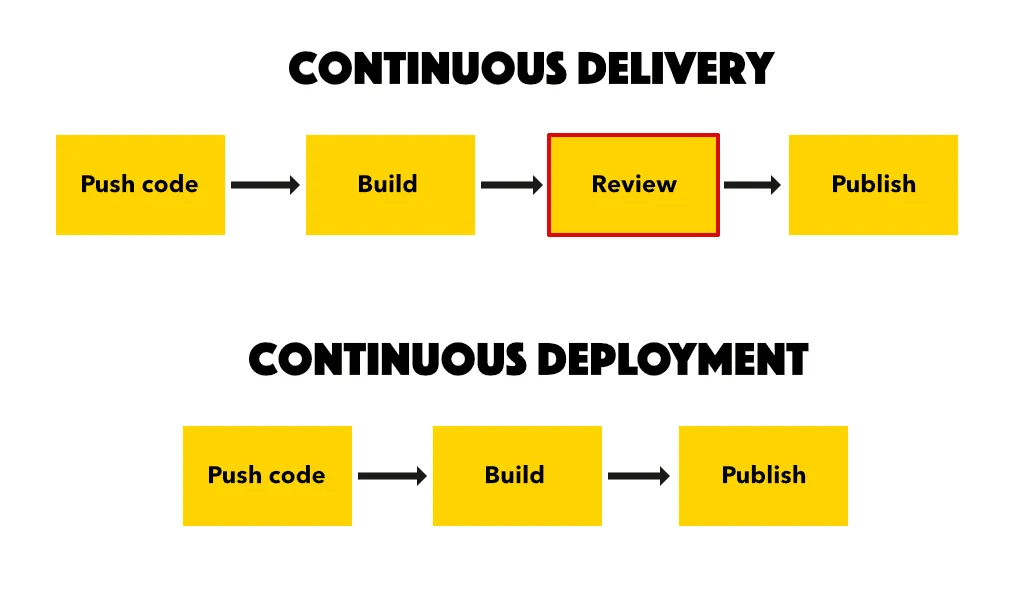
What Is Continuous Delivery (CD)?
Continuous Delivery ensures:
- Code is always in a deployable state
- Releases can happen anytime
- Automated pipelines handle packaging and validation
What Is Continuous Deployment?
Continuous Deployment goes one step further:
- Every successful change is automatically deployed to production
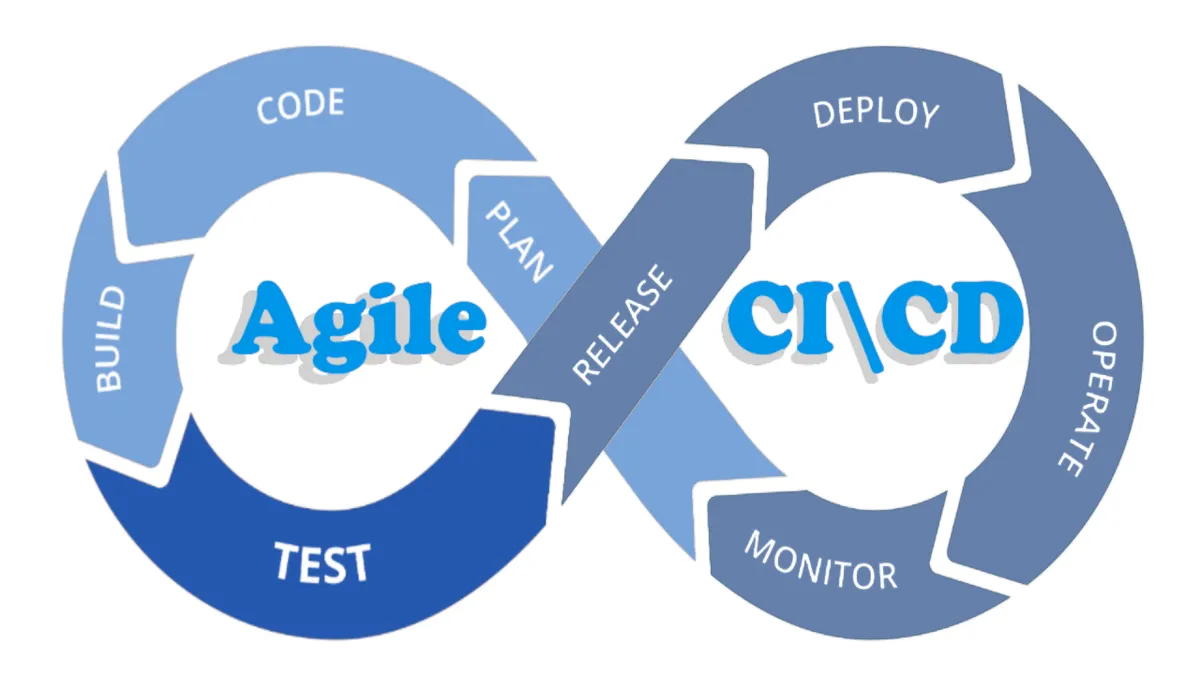
In Agile environments, ci cd in agile ensures rapid and reliable iteration.
Why CI/CD Is Essential for Agile Teams
Agile emphasizes:
- Iterative development
- Rapid feedback
- Customer collaboration
- Frequent releases
CI/CD supports each of these pillars.
1. Faster Feedback Loops
In Agile, feedback is everything.
With CI:
- Tests run automatically
- Bugs are detected instantly
- Developers fix issues immediately
This prevents large-scale failures later.
2. Smaller, Safer Releases
Agile promotes incremental releases.
CI/CD enables:
- Small code changes
- Frequent deployments
- Reduced risk
Large releases increase failure probability. Small releases improve stability.
3. Improved Collaboration
CI/CD promotes:
- Shared ownership
- Transparent workflows
- Automated validation
Developers, testers, and operations teams collaborate efficiently.
4. Higher Quality Software
Automated testing ensures:
- Unit tests
- Integration tests
- Security scans
- Performance checks
Quality becomes continuous—not an afterthought.
How CI/CD Aligns with Agile Frameworks
Different Agile frameworks benefit uniquely from ci cd in agile practices.
CI/CD in Scrum
Scrum uses:
- Sprints
- Sprint planning
- Daily standups
- Sprint reviews
CI/CD supports Scrum by:
- Delivering working increments each sprint
- Reducing integration risks
- Enabling sprint demos with live deployments
Without CI/CD, sprint reviews may showcase incomplete builds.
CI/CD in Kanban
Kanban focuses on:
- Continuous workflow
- Limiting work in progress
- Faster delivery cycles
CI/CD enhances Kanban by:
- Automating handoffs
- Ensuring smooth flow
- Maintaining deployment readiness
Continuous flow requires continuous integration.
Step-by-Step Implementation of CI/CD in Agile
Let’s walk through how to implement ci cd in agile environments.
Step 1: Use Version Control Properly
Everything starts with Git.
Best practices:
- Feature branches
- Pull requests
- Code reviews
- Frequent commits
Integration should happen daily.
Step 2: Automate Build Process
Use CI tools like:
- GitHub Actions
- GitLab CI
- Jenkins
- Azure DevOps
Pipeline should:
- Install dependencies
- Compile code
- Run automated tests
Step 3: Implement Automated Testing
Testing should include:
- Unit tests
- Integration tests
- Regression tests
Automated tests protect sprint goals.
Step 4: Set Up Continuous Delivery
After successful testing:
- Build artifacts
- Deploy to staging
- Run acceptance tests
Deployment should be push-button or automated.
Step 5: Enable Continuous Deployment (Optional)
For mature Agile teams:
- Automatically deploy to production
- Monitor performance
- Roll back instantly if needed
This completes the ci cd in agile cycle.
Real-World Example
A startup practicing Scrum faced repeated sprint delays due to last-minute integration failures.
Before CI/CD:
- Developers merged code at sprint end
- Testing happened manually
- Production releases were stressful
After implementing CI/CD:
- Code merged daily
- Automated tests caught bugs early
- Releases became routine
- Customer satisfaction improved
CI/CD transformed their Agile process.
Benefits of CI/CD in Agile Development
Organizations that adopt ci cd in agile experience:
- Faster time-to-market
- Reduced deployment failures
- Increased team productivity
- Improved code quality
- Better collaboration
Agile without CI/CD slows down over time.
Agile with CI/CD accelerates continuously.
Common Challenges in CI/CD Adoption
Despite its advantages, teams face challenges.
1. Cultural Resistance
Teams used to manual processes may resist automation.
Solution:
- Provide training
- Start small
- Demonstrate benefits
2. Poor Test Coverage
CI/CD is only as good as your tests.
Solution:
- Invest in test automation
- Track coverage metrics
3. Overcomplicated Pipelines
Complex pipelines reduce maintainability.
Solution:
- Keep pipelines simple
- Modularize workflows
4. Lack of Monitoring
Deployment without monitoring is risky.
Solution:
- Implement observability
- Track performance metrics
Best Practices for CI/CD in Agile Teams
Follow these expert recommendations.
1. Integrate Frequently
Do not wait until sprint end.
Merge daily.
2. Automate Everything Possible
From builds to testing to deployment.
Manual steps slow Agile velocity.
3. Maintain Fast Pipelines
Long-running pipelines reduce productivity.
Optimize:
- Test parallelization
- Efficient builds
- Lightweight containers
4. Monitor and Measure
Track:
- Deployment frequency
- Lead time
- Change failure rate
- Mean time to recovery
These DevOps metrics reflect Agile health.
Security in CI/CD for Agile
Security must be integrated early.
Include:
- Static code analysis
- Dependency scanning
- Secret management
- Access control
This approach is often called DevSecOps.
Security should be continuous—not delayed.
Short Summary
CI/CD plays a crucial role in Agile development by enabling:
- Rapid integration
- Continuous testing
- Automated deployment
- Faster feedback
- Improved quality
Ci cd in agile bridges development and operations, ensuring that every sprint delivers working, reliable software.
Conclusion: CI/CD Makes Agile Truly Agile
Agile promises flexibility and speed. CI/CD delivers it.
Without CI/CD:
- Integration becomes painful
- Releases become risky
- Quality declines
With CI/CD:
- Every commit is tested
- Every sprint produces deployable software
- Teams move faster with confidence
The role of ci cd in agile development is not optional—it is foundational.
If you want Agile success, start with automation.
If you want reliable releases, invest in CI/CD.
If you want continuous improvement, integrate continuously.
FAQs (Schema-Friendly)
What is CI/CD in Agile development?
CI/CD in Agile refers to automated integration, testing, and deployment processes that support rapid and reliable software delivery in iterative development cycles.
Why is CI/CD important in Agile?
CI/CD enables faster feedback, smaller releases, better collaboration, and improved software quality, all of which align with Agile principles.
Does every Agile team need CI/CD?
While not mandatory, CI/CD significantly enhances efficiency, reliability, and scalability for Agile teams.
What tools are used for CI/CD in Agile?
Common tools include GitHub Actions, GitLab CI, Jenkins, Azure DevOps, and CircleCI.
How does CI/CD improve sprint performance?
CI/CD reduces integration issues, automates testing, and ensures deployable software at the end of each sprint.