(Main Keyword: python devops pipeline)
Introduction: Why Every Python Project Needs CICD in 2026
Python has become one of the most widely used programming languages in the world. From web development and data science to automation and machine learning, Python powers modern applications at scale. But writing good Python code is only half the battle. Delivering that code reliably, safely, and continuously is where real engineering maturity begins.
That's where a python devops pipeline becomes essential.
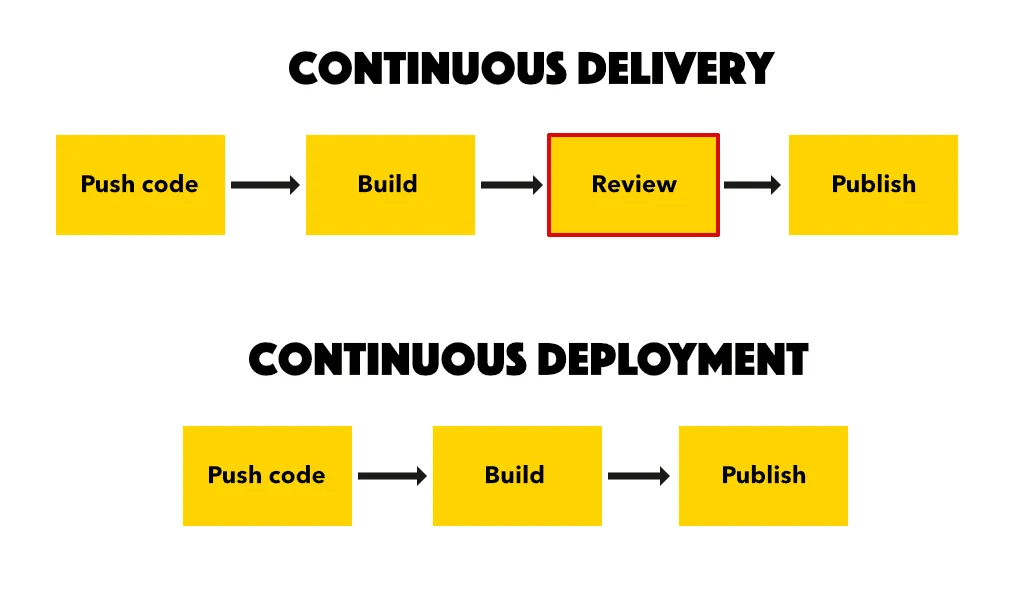
Continuous Integration (CI) and Continuous Deployment (CD) automate testing, building, and releasing your Python applications. Instead of manually running tests or deploying updates, everything happens automatically whenever you push code.
In this complete guide, you'll learn:
- What a python devops pipeline is
- Why CI CD is critical for Python projects
- Step-by-step setup process
- Best tools for automation
- Real-world examples
- Security and testing integration
- Common mistakes to avoid
Whether you're a beginner building your first Flask app or a professional deploying microservices, this guide will help you build a reliable CI CD workflow.
Let's get started.
What Is a Python DevOps Pipeline?
A python devops pipeline is an automated workflow that:
- Pulls your code from version control
- Installs dependencies
- Runs automated tests
- Builds the application
- Deploys it to staging or production
The pipeline runs automatically whenever changes are pushed to your repository.
It ensures:
- Code quality
- Deployment consistency
- Faster release cycles
- Reduced human error
Why CI CD Is Important for Python Projects
Python projects often involve:
- Multiple dependencies
- Virtual environments
- Frameworks like Django or Flask
- APIs or microservices
- Data processing pipelines
Without automation, maintaining consistency becomes difficult.
A properly configured python devops pipeline provides:
- Automatic testing
- Dependency validation
- Version control integration
- Safe deployment
It turns chaotic releases into structured automation.
Core Components of a Python DevOps Pipeline
To understand implementation, let's break down the essential elements.
1. Version Control Git
Your pipeline starts with Git.
Every code push triggers: - Test execution - Build process - Deployment workflow
2. Continuous Integration CI
CI ensures:
- Code is tested automatically
- Build errors are caught early
- Bugs are detected before production
Common CI tools: - GitHub Actions - GitLab CI - Jenkins - CircleCI
3. Automated Testing
Testing is critical in Python projects.
Types of tests: - Unit tests pytest, unittest - Integration tests - API tests - Performance tests
4. Continuous Deployment CD
CD automatically deploys your Python app after passing tests.
Deployment targets may include: - AWS - Azure - Google Cloud - Docker containers - Kubernetes clusters
Step-by-Step Guide: Setting Up CI CD for Python Projects
Now let's walk through a practical setup.
Step 1: Structure Your Python Project Properly
A clean project structure is essential.
Example layout:
- project
- app
- tests
- requirements.txt
- setup.py
Ensure: - Dependencies listed in requirements.txt - Tests stored in a dedicated folder
Step 2: Install Testing Framework
Install pytest:
pip install pytest
Write basic test cases to validate functionality.
Example test:
def test_addition(): assert 2 + 2 == 4
Automated testing is the backbone of any python devops pipeline.
Step 3: Create CI Workflow Configuration
If using GitHub Actions, create:
.githubworkflows python.yml
Example configuration:
name: Python CI
on: push
jobs: build: runs-on: ubuntu-latest steps: - uses: actions checkout v2 - name: Set up Python uses: actions setup python v2 - name: Install dependencies run: pip install -r requirements.txt - name: Run tests run: pytest
Every push now triggers automated tests.
Step 4: Add Deployment Automation
After tests pass, add deployment steps.
Example:
- Build Docker image
- Push image to container registry
- Deploy to cloud environment
This transforms CI into a complete python devops pipeline.
Step 5: Add Environment Variables Securely
Never hardcode secrets.
Use: - GitHub Secrets - GitLab CI variables - Cloud secret managers
Security is critical in DevOps automation.
Dockerizing Python Applications
Containers make deployments consistent.
Create a Dockerfile:
FROM python:3.10 WORKDIR app COPY . . RUN pip install -r requirements.txt CMD python app.py
Integrate Docker build into your pipeline.
Benefits: - Consistent environment - Easier scaling - Simplified deployment
Integrating Python CI CD with Kubernetes
For scalable applications:
- Use Docker containers
- Deploy using Kubernetes
- Automate rollouts
Advanced python devops pipeline setups include:
- Rolling updates
- Auto-scaling
- Health checks
- Canary deployments
Security in Python DevOps Pipeline
Security must be integrated into CI CD.
1. Dependency Scanning
Python projects often rely on third-party libraries.
Use tools like: - pip audit - safety
2. Static Code Analysis
Use: - flake8 - pylint - bandit
These tools catch vulnerabilities early.
3. Secrets Management
Never store:
- API keys
- Database credentials
- Cloud tokens
Use secure environment variables.
Best Practices for Python DevOps Pipeline
1. Keep Pipelines Fast
Slow pipelines reduce productivity.
Optimize by: - Caching dependencies - Running parallel tests
2. Use Branch-Based Workflows
Example: - Feature branches → Run tests only - Main branch → Full deployment
3. Monitor Pipeline Performance
Track: - Build time - Failure rate - Deployment frequency
4. Implement Rollback Strategy
Always prepare for failed deployments.
Automated rollback ensures stability.
Real-World Example
A SaaS startup building a Django app faced:
- Frequent deployment errors
- Inconsistent environments
- Manual testing delays
After implementing a python devops pipeline:
- Automated tests reduced bugs by 60 percent
- Deployment time reduced from 2 hours to 10 minutes
- Production stability improved significantly
Automation transformed delivery efficiency.
Common Mistakes to Avoid
- Skipping automated testing
- Ignoring dependency updates
- Hardcoding secrets
- Overcomplicating pipeline configuration
- Not monitoring deployment health
A clean and secure pipeline is always better than a complex one.
Short Summary
Setting up CI CD for Python projects involves:
- Version control integration
- Automated testing
- Dependency management
- Secure environment configuration
- Docker containerization
- Deployment automation
A well-designed python devops pipeline ensures reliability, scalability, and faster releases.
Conclusion: Automate Python Deployments with Confidence
CI CD is no longer optional---it's a necessity.
By implementing a structured python devops pipeline, you:
- Improve code quality
- Reduce deployment risks
- Accelerate release cycles
- Enhance team collaboration
Start simple: - Add automated tests - Integrate CI - Automate deployment - Improve gradually
Automation builds confidence. Confidence builds scalable software.
FAQs Schema-Friendly
What is a python devops pipeline?
A python devops pipeline is an automated workflow that tests, builds, and deploys Python applications using CI CD practices.
Which tools are best for Python CI CD?
Popular tools include GitHub Actions, GitLab CI, Jenkins, Docker, Kubernetes, and pytest for testing.
Why is testing important in Python CI CD?
Automated testing ensures code reliability, detects bugs early, and prevents faulty deployments.
Can I deploy Python apps automatically?
Yes. CI CD tools allow automatic deployment to cloud servers, containers, or Kubernetes clusters after tests pass.
Is Docker necessary for Python DevOps?
While not mandatory, Docker ensures consistent environments and simplifies deployment processes.