Introduction
Imagine deploying a new feature to production… but only for 5% of your users.
No risky big-bang release.
No downtime.
No panic rollbacks.
If something goes wrong, you simply turn it off — instantly.
That is the power of feature flags DevOps strategy.
In modern software delivery, speed matters. DevOps teams push code multiple times per day. Continuous Integration and Continuous Deployment have become standard practice. But faster releases also increase risk.
Feature flags solve this problem by separating deployment from release.
In this in-depth guide, you will learn:
- What feature flags are and how they work
- Why feature flags DevOps integration is essential
- Types of feature toggles
- Real-world DevOps use cases
- Best practices and common mistakes
- How feature flags improve CI CD pipelines
By the end, you will clearly understand why feature flags are a core pillar of modern DevOps workflows.
What Are Feature Flags?
Feature flags (also called feature toggles) are a technique that allows teams to enable or disable features in software without redeploying code.
Instead of removing unfinished code, developers wrap it in conditional logic.
For example:
If feature flag is ON → show new feature
If feature flag is OFF → hide new feature
This simple idea changes how DevOps teams release software.
Why Feature Flags Matter in DevOps
DevOps focuses on:
- Continuous integration
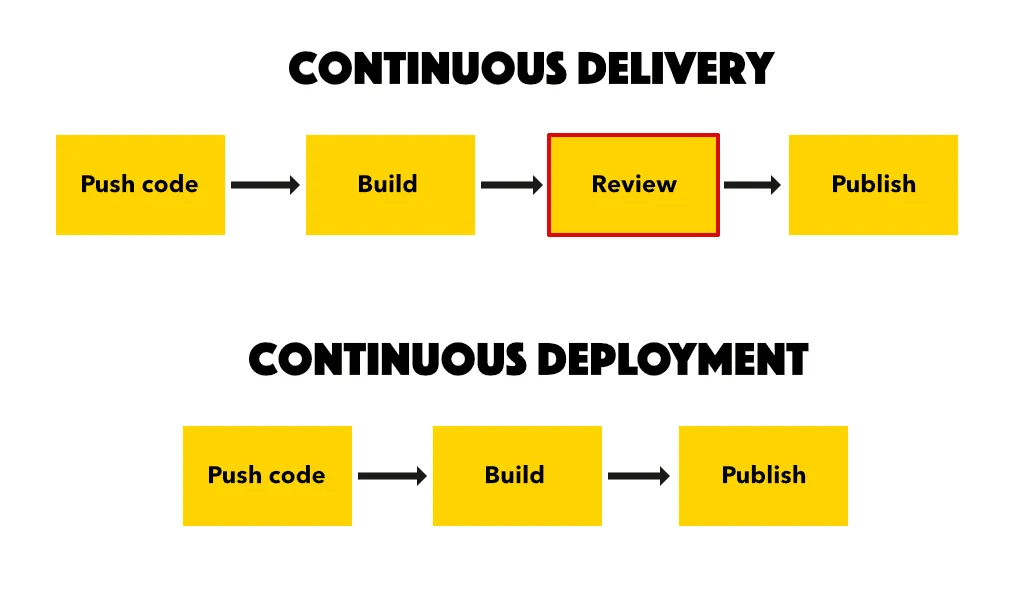
- Continuous delivery
- Automation
- Collaboration
- Fast feedback loops
However, fast deployments increase the risk of production failures.
Feature flags reduce risk by allowing:
- Gradual rollouts
- Quick rollback without redeployment
- Controlled experiments
- Environment-based releases
In feature flags DevOps workflows, deployment becomes safe and predictable.
Deployment vs Release: The Key Difference
Many teams confuse deployment with release.
Deployment
Moving code to production servers.
Release
Making features available to users.
Feature flags separate these two processes.
You can deploy code anytime but release it later when ready.
This flexibility transforms modern DevOps practices.
Types of Feature Flags in DevOps
Not all feature flags are the same.
Release Toggles
Used to hide incomplete features until ready.
Best for:
- Incremental development
- Agile teams
Experiment Toggles
Used for A B testing.
Example:
- Version A for 50% users
- Version B for 50% users
Helps data-driven decision making.
Operational Toggles
Used to control system behavior.
Example:
- Enable caching
- Disable heavy background jobs
Useful during traffic spikes.
Permission Toggles
Used to enable features for specific user groups.
Example:
- Beta testers
- Premium users
Supports targeted rollouts.
How Feature Flags Improve CI CD Pipelines
Continuous integration and continuous delivery require safe deployment strategies.
Feature flags enhance CI CD by:
- Reducing release risk
- Allowing incomplete features in main branch
- Supporting trunk-based development
- Enabling progressive delivery
Instead of maintaining long-lived feature branches, teams merge code frequently and control visibility via flags.
This accelerates DevOps workflows.
Progressive Delivery and Feature Flags
Progressive delivery means releasing features gradually.
Strategies include:
- Canary releases
- Blue green deployments
- Percentage rollouts
Feature flags enable these strategies without complex infrastructure changes.
For example:
Release to 5% users → monitor metrics → increase to 25% → then 100%.
Feature Flags in Microservices Architecture
Microservices add complexity to DevOps environments.
Feature flags help manage distributed systems by:
- Coordinating feature rollout across services
- Disabling faulty components quickly
- Managing backward compatibility
In feature flags DevOps environments, microservices remain flexible and resilient.
Real World Example: E Commerce Platform
Imagine launching a new payment system.
Without feature flags:
- Full rollout
- If error occurs → emergency rollback
- Customer trust impacted
With feature flags:
- Deploy new payment logic
- Enable for internal users
- Gradually expand
- Disable instantly if issue appears
The difference is operational stability.
Benefits of Feature Flags in DevOps
1 Faster Releases
Deploy anytime without waiting for feature completion.
2 Reduced Risk
Quick disable capability prevents outages.
3 Improved Collaboration
Developers and product teams work independently.
4 Better Experimentation
Run A B tests safely.
5 Increased Customer Control
Release features to specific segments.
Feature flags DevOps adoption increases agility.
Challenges of Using Feature Flags
Feature flags are powerful but must be managed properly.
Common issues:
- Flag sprawl
- Forgotten flags
- Technical debt
- Complex configurations
Without governance, flags can become messy.
Best Practices for Feature Flags DevOps Strategy
Keep Flags Temporary
Remove release flags once feature stabilizes.
Name Flags Clearly
Use descriptive names such as:
new_checkout_experience_enabled
Monitor Performance Metrics
Always measure:
- Error rates
- Latency
- User engagement
Limit Access Control
Only authorized users should modify flags.
Centralize Management
Use feature management platforms to avoid confusion.
Feature Flag Management Tools
Several tools support feature flag management:
- LaunchDarkly
- Unleash
- Split
- Flagsmith
These tools provide dashboards, analytics, and governance.
Security Considerations
Feature flags must be secure.
Risks include:
- Unauthorized activation
- Exposure of hidden features
- Data leakage
Best practices:
- Server-side evaluation
- Role-based access control
- Audit logging
Security is critical in feature flags DevOps implementation.
Observability and Monitoring
Feature flags require monitoring.
Track:
- User behavior
- System stability
- Error patterns
Integrate with monitoring tools like Prometheus or Datadog.
Observability ensures safe rollouts.
Feature Flags vs Blue Green Deployment
Feature flags are often confused with deployment strategies.
Blue Green Deployment
Switch traffic between two environments.
Feature Flags
Control feature visibility at application level.
Feature flags provide finer control than infrastructure switching.
How to Implement Feature Flags Step by Step
1 Identify feature requiring control
2 Wrap feature in conditional logic
3 Deploy code to production
4 Configure feature flag management system
5 Enable for small user group
6 Monitor metrics
7 Gradually expand release
8 Remove flag when stable
This systematic approach ensures safe releases.
DevOps Culture and Feature Flags
Feature flags align perfectly with DevOps culture.
They promote:
- Continuous experimentation
- Rapid iteration
- Feedback-driven development
- Shared responsibility
Teams become more confident in releasing software.
Common Mistakes to Avoid
Avoid these errors:
- Using too many permanent flags
- Not documenting flag purpose
- Ignoring cleanup
- Allowing manual flag toggles without tracking
Good governance prevents chaos.
Future of Feature Flags in DevOps
Emerging trends include:
- AI driven rollout optimization
- Automated rollback based on metrics
- Integration with service mesh
- Real time user segmentation
Feature flags will become smarter and more automated.
Short Summary
Feature flags DevOps strategy enables safe deployments, progressive delivery, experimentation, and faster release cycles. By separating deployment from release, teams reduce risk and improve agility.
Strong Conclusion
In modern DevOps environments, speed without safety leads to failure.
Feature flags provide the perfect balance between innovation and stability.
They empower teams to:
- Deploy confidently
- Experiment safely
- Respond instantly to issues
Adopting feature flags DevOps practices is no longer optional — it is essential for scalable, resilient software delivery.
Frequently Asked Questions
Feature flags allow teams to enable or disable features without redeploying code.