Introduction
Imagine deploying your application to Kubernetes.
Traffic starts flowing.
Users increase.
Pods scale automatically.
But suddenly…
One pod gets overloaded.
Another stays underutilized.
Users experience slow responses.
This is where kubernetes load balancing becomes critical.
Kubernetes is powerful because it automates container orchestration, scaling, and service discovery. However, without proper load balancing, even the most scalable cluster can struggle under traffic spikes.
In this complete guide, you will learn:
- What load balancing means in Kubernetes
- How Kubernetes distributes traffic internally
- The difference between Service types
- Ingress controllers and external load balancers
- Best practices for production-grade clusters
- Real-world examples and optimization strategies
By the end, you will fully understand how Kubernetes manages traffic and how to configure load balancing properly for high availability and performance.
What Is Load Balancing?
Load balancing distributes incoming traffic across multiple servers to ensure:
- High availability
- Better performance
- Fault tolerance
- Efficient resource usage
Without load balancing, a single server can become a bottleneck.
In Kubernetes, load balancing happens at multiple layers.
Why Kubernetes Load Balancing Matters
Kubernetes applications typically run inside Pods.
Pods can:
- Scale dynamically
- Restart automatically
- Move between nodes
Because Pods are ephemeral, traffic routing must adjust automatically.
That’s why Kubernetes includes built-in service load balancing mechanisms.
How Kubernetes Networking Works
Before diving deeper, you must understand Kubernetes networking basics.
Kubernetes networking ensures:
- Every Pod gets its own IP
- Pods communicate directly
- Services provide stable endpoints
Kubernetes uses:
- kube-proxy
- CNI plugins
- Cluster IP services
Networking is the foundation of kubernetes load balancing.
Kubernetes Service Types and Load Balancing
Kubernetes provides different Service types to expose applications.
ClusterIP Service
Default service type.
- Internal load balancing
- Accessible only within cluster
Used for microservices communication.
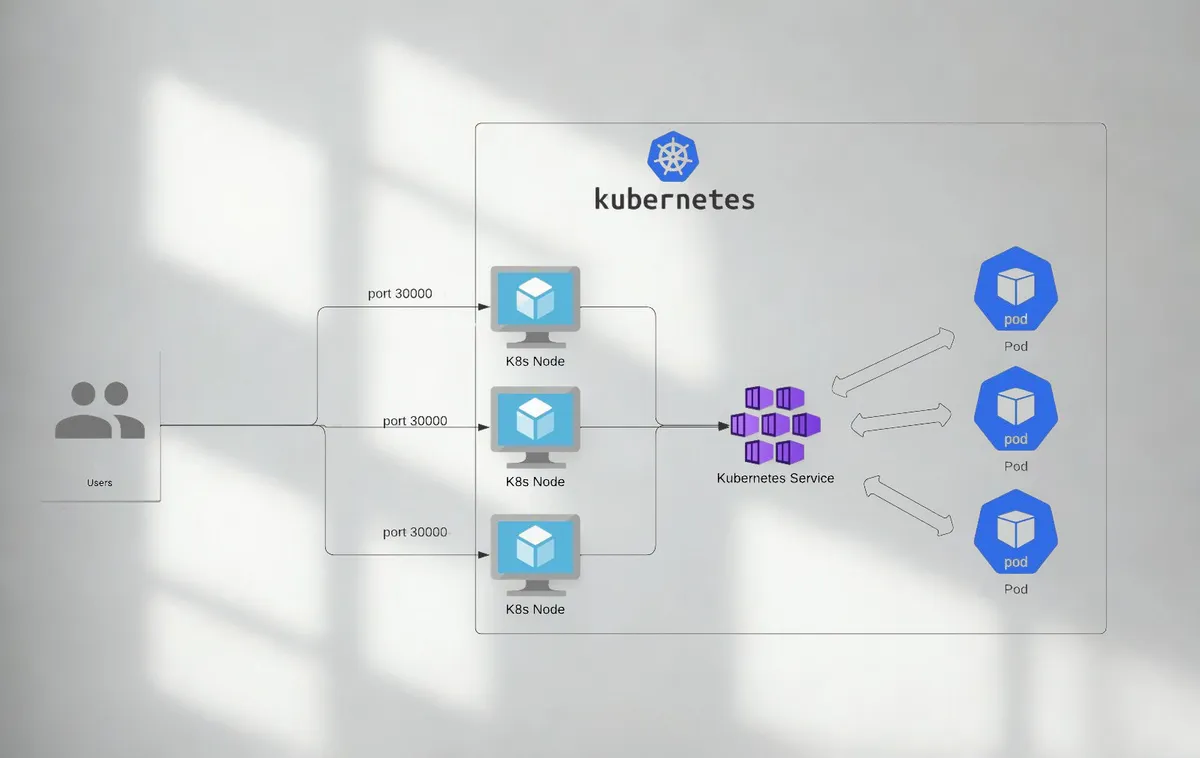
NodePort Service
Exposes service on each node’s IP at a static port.
- Allows external access
- Not ideal for production alone
LoadBalancer Service
Integrates with cloud provider load balancers.
- Automatically provisions external load balancer
- Distributes traffic across nodes
Common in AWS, Azure, and GCP clusters.
Headless Service
Used for direct Pod access without load balancing.
Useful for stateful applications.
Internal Load Balancing in Kubernetes
Internal traffic distribution happens via kube-proxy.
How It Works
- Client sends request to Service
- kube-proxy forwards request
- Traffic routed to available Pods
Kubernetes uses:
- iptables
- IPVS
These methods ensure round-robin load distribution.
External Load Balancing with Cloud Providers
When using managed Kubernetes, LoadBalancer services integrate with cloud load balancers.
Example Workflow
- Create Service of type LoadBalancer
- Cloud provider provisions load balancer
- External IP assigned
- Traffic distributed to nodes
This simplifies production deployments.
Ingress Controllers in Kubernetes
Ingress manages HTTP and HTTPS routing.
Instead of exposing multiple services individually, Ingress centralizes routing.
Benefits of Ingress
- Path-based routing
- Host-based routing
- SSL termination
- Centralized configuration
Popular Ingress controllers:
- NGINX Ingress
- Traefik
- HAProxy
Ingress improves kubernetes load balancing for web applications.
Layer 4 vs Layer 7 Load Balancing
Understanding OSI layers helps clarify load balancing types.
Layer 4 Load Balancing
Routes traffic based on IP and port.
Fast and simple.
Layer 7 Load Balancing
Routes traffic based on HTTP headers and URLs.
Enables advanced routing logic.
Kubernetes supports both through Services and Ingress.
Kubernetes Load Balancing Algorithms
Kubernetes typically uses round robin distribution.
However, external load balancers may support:
- Least connections
- IP hash
- Weighted routing
Choosing the right algorithm depends on application requirements.
Horizontal Pod Autoscaling and Load Balancing
Scaling impacts load distribution.
Horizontal Pod Autoscaler
Automatically increases Pod replicas based on:
- CPU usage
- Memory usage
- Custom metrics
Load balancers automatically include new Pods.
This combination ensures dynamic scalability.
Service Mesh and Advanced Load Balancing
Service mesh tools provide enhanced traffic control.
Popular service mesh tools:
- Istio
- Linkerd
Advanced Features
- Traffic splitting
- Canary deployments
- Circuit breaking
- Observability
Service mesh adds intelligent traffic management beyond basic kubernetes load balancing.
High Availability in Kubernetes Clusters
Load balancing ensures redundancy.
Best practices include:
- Multi node clusters
- Multiple replicas
- Health checks
- Pod readiness probes
Health checks prevent routing traffic to unhealthy Pods.
Readiness and Liveness Probes
Probes ensure proper traffic routing.
Readiness Probe
Determines if Pod is ready to receive traffic.
Liveness Probe
Determines if Pod should be restarted.
Proper probe configuration improves reliability.
Handling Traffic Spikes
Production clusters must survive sudden traffic growth.
Strategies:
- Enable autoscaling
- Use resource limits
- Configure rate limiting
- Implement caching
Load balancing alone is not enough without resource planning.
Network Policies and Security
Load balancing must consider security.
Best practices:
- Restrict internal traffic
- Use TLS encryption
- Configure firewall rules
- Enable mutual TLS in service mesh
Secure traffic handling is essential.
Observability and Monitoring
Monitoring traffic helps optimize performance.
Tools include:
- Prometheus
- Grafana
- Kubernetes Dashboard
Track metrics like:
- Request latency
- Error rate
- Throughput
Observability strengthens cluster stability.
Real World Example
Imagine deploying an ecommerce platform on Kubernetes.
Without proper load balancing:
- Checkout service crashes
- Payment requests fail
- Customers abandon carts
With configured LoadBalancer + Ingress + Autoscaling:
- Traffic distributed evenly
- Services scale automatically
- Zero downtime during traffic spikes
Production stability depends on architecture.
Common Kubernetes Load Balancing Mistakes
Avoid these errors:
- Using NodePort in production
- Ignoring readiness probes
- Overlooking autoscaling
- Not configuring resource limits
- Skipping monitoring setup
Proper configuration prevents outages.
Step by Step Setup for Kubernetes Load Balancing
1 Deploy application Pods
2 Create ClusterIP service
3 Expose via Ingress or LoadBalancer
4 Configure readiness probes
5 Enable Horizontal Pod Autoscaler
6 Monitor performance metrics
7 Optimize based on traffic patterns
Systematic setup ensures stability.
Future of Kubernetes Load Balancing
Emerging trends include:
- eBPF based networking
- Edge Kubernetes clusters
- AI driven traffic optimization
- Multi cluster load balancing
Kubernetes continues evolving rapidly.
Short Summary
This kubernetes load balancing guide explained Service types, internal traffic routing, Ingress controllers, autoscaling, service mesh, and production best practices for high availability and scalable deployments.
Strong Conclusion
Load balancing in Kubernetes is not just a configuration detail — it is the backbone of scalable cloud native applications.
By combining Services, Ingress, autoscaling, health checks, and observability, teams can build highly available systems capable of handling massive traffic efficiently.
Mastering kubernetes load balancing is essential for modern DevOps engineers and full stack developers working with containerized infrastructure.
Frequently Asked Questions
It distributes traffic across Pods to ensure high availability and performance.