(Main Keyword: kubernetes architecture basics)
Introduction: Why Understanding Kubernetes Architecture Matters
If you are stepping into the world of containers and cloud-native applications, you’ve probably heard this statement:
“Learn Kubernetes.”
But here’s the challenge—Kubernetes can feel overwhelming at first.
Pods, nodes, clusters, services, control plane, etcd, kube-scheduler… the terminology alone can confuse beginners. That’s why understanding kubernetes architecture basics is the key to mastering container orchestration.
Kubernetes is not just a tool. It is a distributed system designed to:
- Automate container deployment
- Scale applications efficiently
- Ensure high availability
- Self-heal workloads
In this complete guide, we will break down Kubernetes architecture in the simplest possible way. You’ll learn:
- What Kubernetes architecture looks like
- How the control plane works
- What worker nodes do
- How pods, services, and networking fit together
- Real-world examples
- Practical tips for beginners
By the end of this article, kubernetes architecture basics will feel structured, logical, and approachable.
What Is Kubernetes?
Kubernetes is an open-source container orchestration platform that automates:
- Deployment
- Scaling
- Management of containerized applications
Instead of manually managing containers, Kubernetes handles:
- Scheduling
- Load balancing
- Self-healing
- Rollouts and rollbacks
Understanding kubernetes architecture basics helps you see how all these features work behind the scenes.
High-Level Overview of Kubernetes Architecture
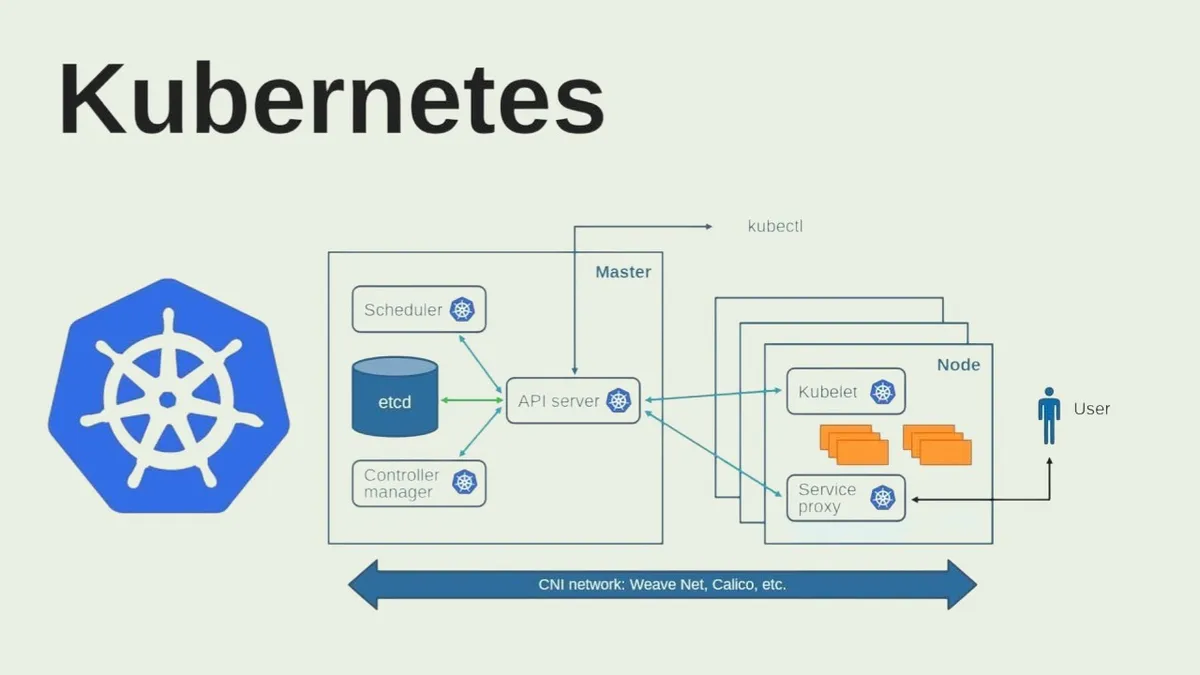
At a high level, Kubernetes architecture consists of:
- Control Plane Master components
- Worker Nodes
- Cluster Networking
A Kubernetes cluster is made up of multiple machines that work together.
The Control Plane is the brain, Worker Nodes are the muscles, and Pods are the application units.
Kubernetes Control Plane Components
The Control Plane manages the entire cluster and makes global decisions such as scheduling workloads and maintaining cluster state.
1. API Server
The API Server is the central communication hub. Every request goes through it and it validates and processes configurations.
2. etcd
etcd is a distributed key-value store that stores cluster configuration and state data.
3. Scheduler
The Scheduler decides which node should run a pod based on resource availability.
4. Controller Manager
Controllers maintain the desired state of the cluster and ensure applications run as defined.
Worker Node Components
Worker nodes run actual applications.
1. Kubelet
Kubelet ensures containers are running as defined and communicates with the API Server.
2. Container Runtime
The container runtime pulls images and executes containers.
3. Kube Proxy
Kube Proxy manages networking and routes traffic between services.
Understanding Pods in Kubernetes Architecture
Pods are the smallest deployable unit in Kubernetes. They contain one or more containers and share networking and storage.
If a pod fails, Kubernetes replaces it automatically.
Services and Networking in Kubernetes
Services provide stable IP addresses and load balancing, ensuring reliable communication between pods.
Types include ClusterIP, NodePort, and LoadBalancer.
Kubernetes Architecture Workflow Example
- Developer deploys an application using YAML.
- API Server receives configuration.
- Scheduler assigns pod to a node.
- Kubelet pulls container image.
- Pod starts running.
- Service exposes application.
- Monitoring tools track performance.
Scaling in Kubernetes Architecture
Scaling is achieved by adjusting replica counts. Kubernetes automatically schedules additional pods and balances traffic.
Self-Healing in Kubernetes
If containers crash or nodes fail, Kubernetes restarts and reschedules workloads automatically.
Kubernetes Architecture vs Traditional Architecture
Traditional systems require manual scaling and failover. Kubernetes provides automated scaling and declarative configuration.
Best Practices for Learning Kubernetes Architecture
- Start with local clusters
- Practice writing YAML files
- Visualize architecture
- Focus on core concepts first
Common Mistakes Beginners Make
- Ignoring resource limits
- Overcomplicating setup
- Skipping networking fundamentals
Real-World Example
Companies migrating to Kubernetes experience zero-downtime deployments, auto-scaling, and improved reliability.
Short Summary
Kubernetes architecture includes control plane components, worker nodes, pods, and services that together enable scalable and reliable container orchestration.
Conclusion
Understanding kubernetes architecture basics builds a strong foundation for DevOps and cloud-native development.
FAQs
What are kubernetes architecture basics?
They include understanding control plane components, worker nodes, pods, and services.
What is the control plane?
The control plane manages cluster state and scheduling.
What is a pod?
A pod is the smallest deployable unit that runs containers.