Introduction
In DevOps, speed is everything.
Deployments move fast. CI/CD pipelines run dozens of times a day. Multiple developers push to the same repositories. Hotfixes must be shipped instantly. Rollbacks must be precise.
In such high-pressure environments, basic Git knowledge is not enough.
You need advanced git commands for devops workflows — commands that help you manage branches safely, recover from mistakes, inspect history deeply, optimize pipelines, and collaborate efficiently at scale.
In this comprehensive guide, you will learn:
- Essential advanced Git commands for DevOps engineers
- Real-world DevOps use cases
- Git strategies for CI/CD environments
- Recovery and rollback techniques
- Branching models and workflow optimization
- Performance and automation tips
Whether you’re a student entering DevOps, a beginner developer, or an experienced SRE, mastering these commands will dramatically improve your operational efficiency.
Why Git Mastery Is Critical in DevOps
DevOps revolves around:
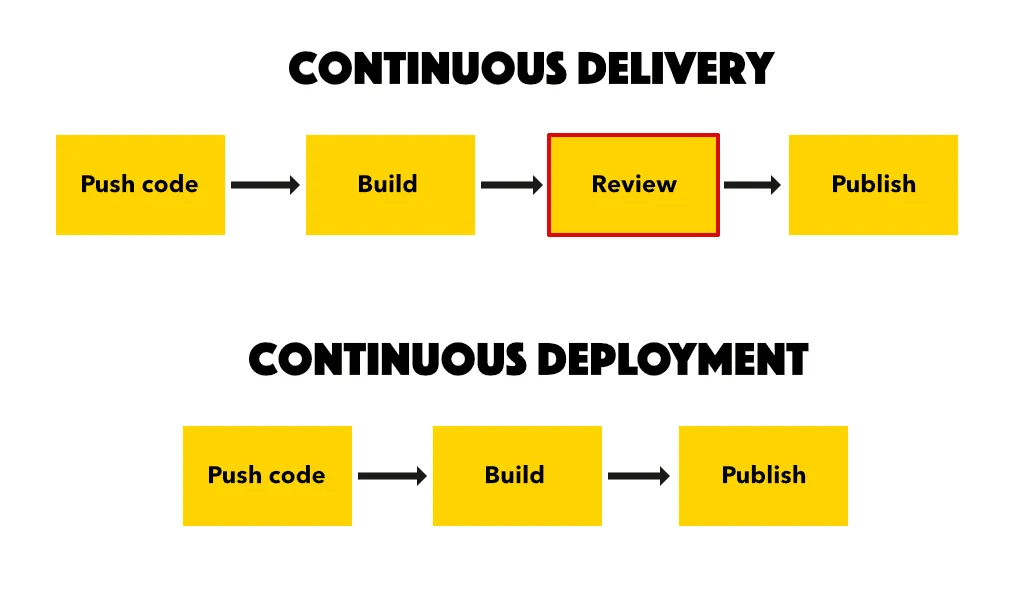
- Continuous Integration
- Continuous Delivery
- Infrastructure as Code
- Version-controlled deployments
Git acts as the single source of truth for:
- Application code
- Infrastructure configurations
- Kubernetes manifests
- CI/CD pipeline files
Without strong Git control, DevOps pipelines become unstable and risky.
Understanding Git in DevOps Workflows
Before diving into commands, remember that in DevOps:
- Every commit may trigger CI pipelines
- Every merge may deploy to staging
- Every tag may trigger production release
This makes Git operations directly tied to infrastructure behavior.
Advanced git commands for devops help ensure stability and traceability.
Advanced Git Branch Management Commands
1. git rebase for Clean Commit History
Rebasing rewrites commit history to create a cleaner timeline.
Why It Matters in DevOps
- Keeps feature branches linear
- Avoids messy merge commits
- Simplifies debugging
Example
git checkout feature-branch
git rebase main
This reapplies your commits on top of the latest main branch.
When to Use
- Before merging feature branches
- In collaborative DevOps pipelines
2. git cherry-pick for Selective Fixes
Cherry-pick applies a specific commit to another branch.
DevOps Use Case
You deployed a hotfix to production but forgot staging.
Instead of merging entire branches:
git cherry-pick <commit-hash>
This applies only the required fix.
3. git stash for Temporary Changes
Stash allows you to save uncommitted changes temporarily.
git stash
git stash pop
DevOps Scenario
You’re mid-debugging when production issue appears.
Stash current work → switch branch → fix production → return safely.
Advanced Git History Inspection Commands
4. git reflog for Disaster Recovery
Reflog tracks all branch movements.
If you accidentally delete commits:
git reflog
git checkout <lost-commit-hash>
This is one of the most powerful git commands for devops professionals handling high-risk repositories.
5. git bisect for Bug Hunting
Bisect performs binary search on commit history to find the commit that introduced a bug.
git bisect start
git bisect bad
git bisect good <commit>
Git automatically checks out commits to help identify faulty code.
DevOps Benefit
Reduces debugging time dramatically in CI/CD environments.
6. git blame for Accountability
git blame filename
Shows who modified each line and when.
Useful for:
- Investigating production bugs
- Understanding infrastructure file changes
Advanced Merge Strategies in DevOps
Fast-Forward vs No-Fast-Forward
git merge --no-ff feature-branch
No-fast-forward preserves branch history.
In DevOps, this improves auditability.
Squash Merging
git merge --squash feature-branch
Combines multiple commits into one.
Useful when:
- Cleaning feature branch history
- Maintaining production clarity
Git Reset vs Git Revert
This is critical for DevOps engineers.
git reset (Dangerous in Shared Repos)
git reset --hard HEAD~1
Rewrites history.
Only safe in local branches.
git revert (Safe for Production)
git revert <commit-hash>
Creates new commit undoing changes.
Recommended for production rollback in CI/CD pipelines.
Git Tags for Production Releases
Tags are essential in DevOps release management.
git tag -a v1.0 -m "Production release"
git push origin v1.0
CI/CD tools often trigger deployments based on tags.
Advanced Git Hooks in DevOps
Git hooks automate tasks.
Examples:
- Pre-commit linting
- Pre-push tests
- Security checks
Hooks improve DevOps pipeline reliability before code even reaches CI.
Git Submodules for Infrastructure
Submodules allow one repository inside another.
Used in:
- Microservices architectures
- Shared infrastructure libraries
git submodule add <repo-url>
Git Worktrees for Parallel Development
Worktrees allow multiple branches checked out simultaneously.
git worktree add ../hotfix-branch hotfix
DevOps engineers can work on hotfixes while maintaining feature development.
Git Strategies for DevOps Teams
GitFlow
Structured branching model:
- main
- develop
- feature
- release
- hotfix
Suitable for enterprise DevOps.
Trunk-Based Development
Single main branch with short-lived branches.
Better for:
- Continuous Deployment
- Fast-moving startups
Performance Optimization Commands
Shallow Clone for CI
git clone --depth 1 <repo-url>
Reduces CI pipeline execution time.
Prune Deleted Branches
git fetch --prune
Keeps local repositories clean.
Security Best Practices in Git for DevOps
- Never commit secrets
- Use .gitignore properly
- Enable commit signing
- Use branch protection rules
- Implement code review policies
Security is part of DevOps culture.
Common Git Mistakes in DevOps
- Force pushing to shared branches
- Rebasing public branches
- Not tagging production releases
- Ignoring commit messages
- Mixing infrastructure and application changes without clarity
Real-World DevOps Scenario
Imagine:
- Production bug detected
git bisectidentifies faulty commitgit revertsafely rolls back changegit cherry-pickapplies fix to staging- Tag created for patched release
This workflow demonstrates mastery of git commands for devops.
Short Summary
Advanced git commands for devops professionals include rebase, cherry-pick, reflog, bisect, revert, and worktrees. These commands improve collaboration, debugging, release management, and CI/CD stability.
Strong Conclusion
Git is not just a version control system in DevOps.
It is the foundation of:
- Deployment automation
- Infrastructure versioning
- Release tracking
- Incident recovery
Mastering advanced git commands for devops ensures:
- Faster debugging
- Safer rollbacks
- Cleaner histories
- More stable pipelines
In DevOps, Git mastery equals operational confidence.
Invest the time. Practice advanced workflows. Your future deployments depend on it.
Frequently Asked Questions
Rebase, cherry-pick, revert, reflog, bisect, and tag are essential for DevOps workflows.