
OAuth 2.0 Explained Simply
Introduction
Every day, millions of users log in to apps using buttons like “Continue with Google,” “Login with Facebook,” or “Sign in with Apple.” But have you ever wondered how these applications access your data without ever asking for your actual password?
The answer lies in OAuth 2.0, a secure authorization framework used by companies like Google, Microsoft, Amazon, GitHub, and countless modern applications.
In this simple and beginner-friendly OAuth tutorial, you will learn:
- What OAuth 2.0 is and why it was created
- How OAuth works step-by-step
- The four main OAuth roles
- OAuth grant types explained with real examples
- Security best practices and expert insights
- When and why you should use OAuth 2.0
- Common mistakes to avoid
By the end, you will understand OAuth 2.0 like a pro — without getting lost in confusing technical jargon.
Let’s begin.
What Is OAuth 2.0? (Simple Explanation)
OAuth 2.0 is an authorization protocol that allows an app to access a user’s data without needing their password.
The Core Idea of OAuth
Instead of giving an app your login credentials (dangerous), OAuth allows apps to use tokens to access only the data you permit.
Example:
When you click “Login with Google,” Google asks you:
“Allow this app to view your basic profile?”
If you approve, Google shares your profile using a secure access token, not your password.
Why OAuth Exists
Before OAuth, third-party apps had to store user passwords. This caused:
- Security risks
- Password leaks
- Trust issues
- No control over what data apps accessed
OAuth solved all of these.
LSI Keywords Used:
oauth tutorial, oauth explained, oauth 2.0 basics, authorization protocol, access tokens
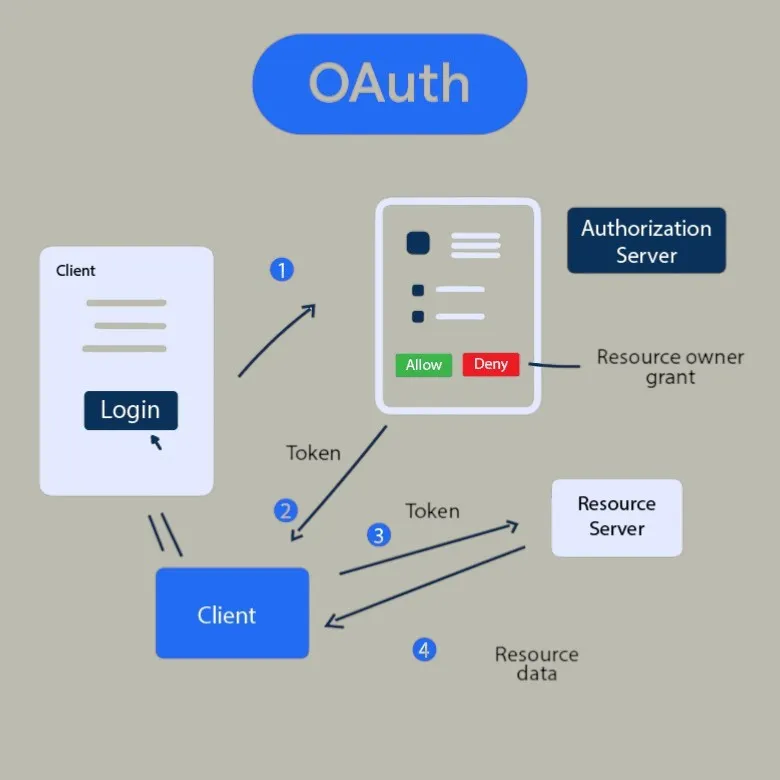
How OAuth 2.0 Works (Step-by-Step Tutorial)
OAuth 2.0 can feel confusing at first, so here’s the simplest breakdown.
Step 1 — User Requests Login
The user clicks:
“Sign in with Google / GitHub / Facebook.”
Step 2 — App Redirects to Authorization Server
The app sends the user to Google (or another provider) asking for permission to access specific data.
Example request:
- Profile info
- Contacts
- Calendar
Step 3 — User Grants Permission
Google displays a consent screen:
“Allow this app to access your profile?”
If the user approves → OAuth continues.
If not → Access denied.
Step 4 — Authorization Server Sends Authorization Code
Google sends a temporary authorization code to the application.
This code is short-lived and cannot be used to access data directly.
Step 5 — App Trades Code for Access Token
The app sends the authorization code to Google’s backend and receives:
- Access Token (JWT or opaque token)
- Refresh Token (optional)
Step 6 — App Uses Token to Access User Data
Now the app can call:
https://www.googleapis.com/userinfo
Google verifies the token and returns the user’s profile.
Step 7 — User Is Logged In
The user never gave the app their password — only permissions.
OAuth 2.0 Roles Explained (Beginner-Friendly)
OAuth has four main components:
1. Resource Owner (User)
The person granting access to their data.
2. Client (Application)
The app requesting access (e.g., Spotify, Zoom).
3. Authorization Server
The system that authenticates the user and issues tokens
(e.g., Google OAuth, GitHub OAuth).
4. Resource Server
Where the actual data is stored (e.g., Google APIs).
These four pieces work together to make OAuth secure and scalable.
OAuth Tokens Explained
OAuth uses two main types of tokens:
1. Access Token
- Used to access APIs
- Short-lived (minutes to hours)
- Must be protected
2. Refresh Token
- Used to get a new access token without logging in
- Long-lived
- Must be stored securely
Example token (JWT style):
eyJhbGciOiJSUzI1NiIsInR5cCI6IkpXVCJ9...
Tokens replace passwords in modern apps — safer and limited in scope.
OAuth 2.0 Grant Types (With Practical Examples)
OAuth supports several workflows called grant types.
Here’s the simplest explanation of each.
1. Authorization Code Grant (Most Secure)
Used by:
- Web apps
- Mobile apps
- Server-side apps
Why it’s secure:
Tokens are exchanged on the backend, not exposed to the browser.
Real example:
Login with Google → redirected back to your app.
2. PKCE Authorization Code Grant (Recommended for Mobile or SPA)
PKCE = Proof Key for Code Exchange.
Used by:
- React apps
- Vue apps
- Mobile apps
Prevents attackers from stealing authorization codes.
3. Client Credentials Grant
Used for machine-to-machine access.
Example:
A backend server calling another service:
Server A → Server B
No user involved.
4. Resource Owner Password Grant (Deprecated)
This grant allowed apps to ask for your actual password.
Example:
“YouTube Downloader app asking for your Google password.”
This is extremely insecure and no longer recommended.
5. Refresh Token Grant
Used to get a new access token automatically.
Example:
Spotify app keeps you logged in without re-entering your password.
OAuth vs OAuth 2.0 (Important Difference)
| Feature | OAuth 1.0 | OAuth 2.0 |
|---|---|---|
| Complexity | High | Low |
| Signature-based | Yes | No |
| Token type | Custom | Bearer/JWT |
| Scalability | Low | Very high |
| Security | Strong but complex | Strong + flexible |
OAuth 2.0 is widely used today because it is simpler, faster, and easier to implement.
OAuth 2.0 vs OpenID Connect (OIDC)
These two are often confused.
OAuth 2.0
Used for authorization (access to data).
OIDC
Used for authentication (logging in the user).
If you want login + profile → use OpenID Connect, which is built on top of OAuth 2.0.
Real-World Examples of OAuth 2.0
1. Google Login
Apps use Google OAuth to access:
- Name
- Profile
2. GitHub OAuth for Developers
Used for:
- Accessing repositories
- Automating CI/CD
- Granting limited permissions
3. Facebook Login
Used by gaming apps and shopping apps for quick access.
4. Zoom OAuth
Used for integrating Zoom meetings in apps.
5. Spotify OAuth
Allows apps to:
- Modify playlists
- Pause music
- Read playback data
OAuth is everywhere.
Why Developers Use OAuth 2.0 (Benefits)
1. No Password Sharing
Users never share passwords with third-party applications.
2. Better Security
Tokens have scopes, expiry times, and can be revoked.
3. Scalable for Modern Apps
Works perfectly with:
- Mobile apps
- Microservices
- Web apps
- SaaS
- APIs
4. User-Friendly
“Login with Google” is faster, safer, and familiar.
5. Supports Fine-Grained Permissions
Example scopes:
- read:user
- write:user
- email profile
OAuth Security Best Practices
1. Always Use HTTPS
Prevents token interception.
2. Use Short-Lived Access Tokens
Reduces damage if stolen.
3. Store Refresh Tokens Securely
Use:
- Browser secure storage
- HTTP-only cookies
4. Never Embed Secrets in Frontend Code
React / Angular apps should use PKCE.
5. Validate Redirect URLs
Prevents phishing attacks.
6. Implement Token Revocation
Allows users to disconnect apps anytime.
7. Use State + PKCE for Extra Protection
These prevent CSRF and code injection attacks.
Common Mistakes to Avoid
❌ Storing tokens in localStorage
(Prone to XSS attacks)
❌ Using the Password Grant
(it is deprecated)
❌ Not validating the issuer and audience
(attacker could forge tokens)
❌ Using long-lived access tokens
(more risk)
❌ Allowing wildcard redirect URLs
(serious security vulnerabilities)
Avoid these to build a secure OAuth system.
Short Summary
OAuth 2.0 is a secure, flexible, and modern authorization system that allows applications to access user data without requiring passwords. It uses tokens, permissions, and well-defined flows to ensure safe communication between clients and servers. Whether you’re building a mobile app, a SaaS product, or a web application, OAuth 2.0 is the industry-standard solution for secure access and authentication workflows.
Conclusion
OAuth 2.0 powers the modern web—not just by enabling secure logins, but by giving users confidence that their data is protected. With token-based access, clear scopes, controlled permissions, and flexible grant types, OAuth 2.0 has become the backbone of authorization for APIs, cloud services, and apps worldwide.
By understanding how OAuth works, the different grant types, and best security practices, you now have the foundation to integrate OAuth securely and confidently into your applications.
If you’re building anything that interacts with user data, OAuth 2.0 isn’t optional — it’s essential.
Frequently Asked Questions
OAuth is used for secure authorization — allowing apps to access user data without sharing passwords.



