
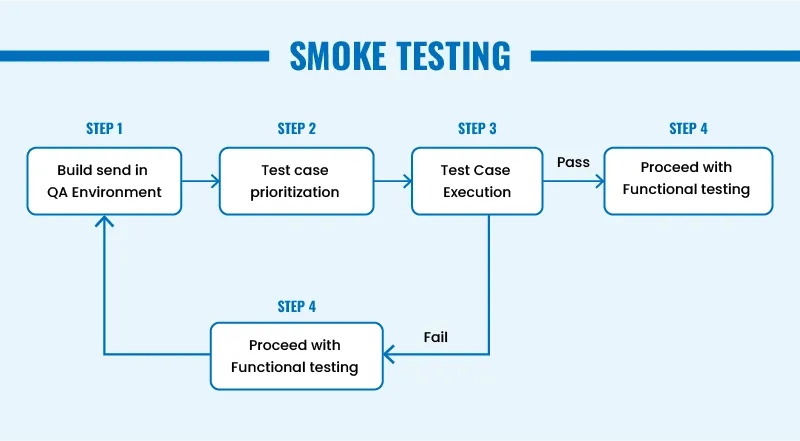
Software testing is full of different techniques and strategies, but one of the simplest—yet most powerful—approaches is smoke testing. Also known as build verification testing (BVT), smoke testing ensures the basic stability of your application before deeper testing begins.
Think of it as a quick health check for your software. If the build is too unstable to even start testing, why bother diving deeper?
In this complete guide, you’ll learn what smoke testing is, why it matters, how it works, and detailed smoke testing examples for web, mobile, and API applications. We’ll also cover step-by-step execution, best practices, and real-world use cases—all written in a beginner-friendly yet expert tone.
Smoke testing is a high-level, shallow, but critical test round performed on a new build to ensure the basic functionalities work. If the build passes smoke testing, it's considered stable enough for further testing.
The term originally comes from hardware testing:
If a device started up without “smoking,” it passed the smoke test.
In software, it means:
Does the application start successfully and perform the most essential tasks without breaking?
Many beginners confuse the two. Here's the difference:
| Feature | Smoke Testing | Sanity Testing |
|---|---|---|
| Purpose | Check build stability | Verify minor fixes |
| Coverage | Broad & shallow | Narrow & deep |
| When performed? | After receiving a new build | After bug fixes |
| Example | Check login, homepage, dashboard | Check updated login validation |
| Automation suitability | Highly suitable | Partially suitable |
Smoke testing typically falls into three types:
2. Automated Smoke Testing
Automated scripts validate core features.
Tools commonly used:
- Selenium
- Cypress
- Playwright
- Postman
- TestNG
- Jenkins
How to Perform Smoke Testing (Step-by-Step)
Step 2 — Understand What’s Changed
Identify:
- Modules updated
- High-risk areas
- Integration impact
Step 4 — Execute High-Level Tests
Perform flows such as:
- Launch app
- Login
- Navigation
- CRUD operations
- API health check
Step 6 — Notify Developers
Share:
- Failed test steps
- Attachments
- Logs
- Screenshots
Smoke Testing Examples (Real-World Scenarios)
Below are practical smoke testing examples for web, mobile, and API systems.
Smoke Testing Examples for Mobile Apps
1. App Launch
- No crash on startup
2. Sign-in Flow
- Login page works
3. Navigation
- Tabs, swipes, scrolls
4. Push Notification Permission
- Accept/deny works smoothly
5. Critical Button Actions
- Add to favorites
- Add to cart
Smoke Testing Examples for E-Commerce Apps
1. Homepage Loads
2. Product Search Works
3. Add to Cart Works
4. Checkout Page Loads
5. Payment Gateway Opens
Automated Smoke Testing Example (Postman)
pm.test("API is available", function () {
    pm.response.to.have.status(200);
});
Where Does Smoke Testing Fit?
Performed:
- After new build deployment
- Before deeper testing
Short Summary
Smoke testing verifies that the basic functions of an application work before full-scale testing. It prevents wasted QA time, improves release quality, boosts DevOps efficiency, and ensures faster delivery.
FAQs
1. What is smoke testing?
A quick test to verify that key features work after a new build.
2. What are examples of smoke testing?
Login, homepage load, basic navigation, health check APIs.
3. Who performs smoke testing?
QA, developers, and DevOps teams.
4. Can smoke testing be automated?
Yes—automation is ideal for CI/CD environments.
5. Is smoke testing done before or after regression testing?
Before. It determines whether regression should proceed.



