
Introduction
In the realm of JavaScript-based browser automation, two names often dominate the conversation: Playwright and Puppeteer. Both are powerful tools originated from the same engineering DNA (many of the creators of Puppeteer moved to Microsoft to build Playwright). However, as we move into 2026, their paths have diverged significantly.
If you're starting a new project or considering migrating your existing tests, understanding the core differences between these two frameworks is crucial. In this guide, we'll provide a deep-dive comparison across several key dimensions to help you make an informed decision.
1. Cross-Browser Support: The Big Difference
The most significant distinction between the two frameworks is their approach to browsers.
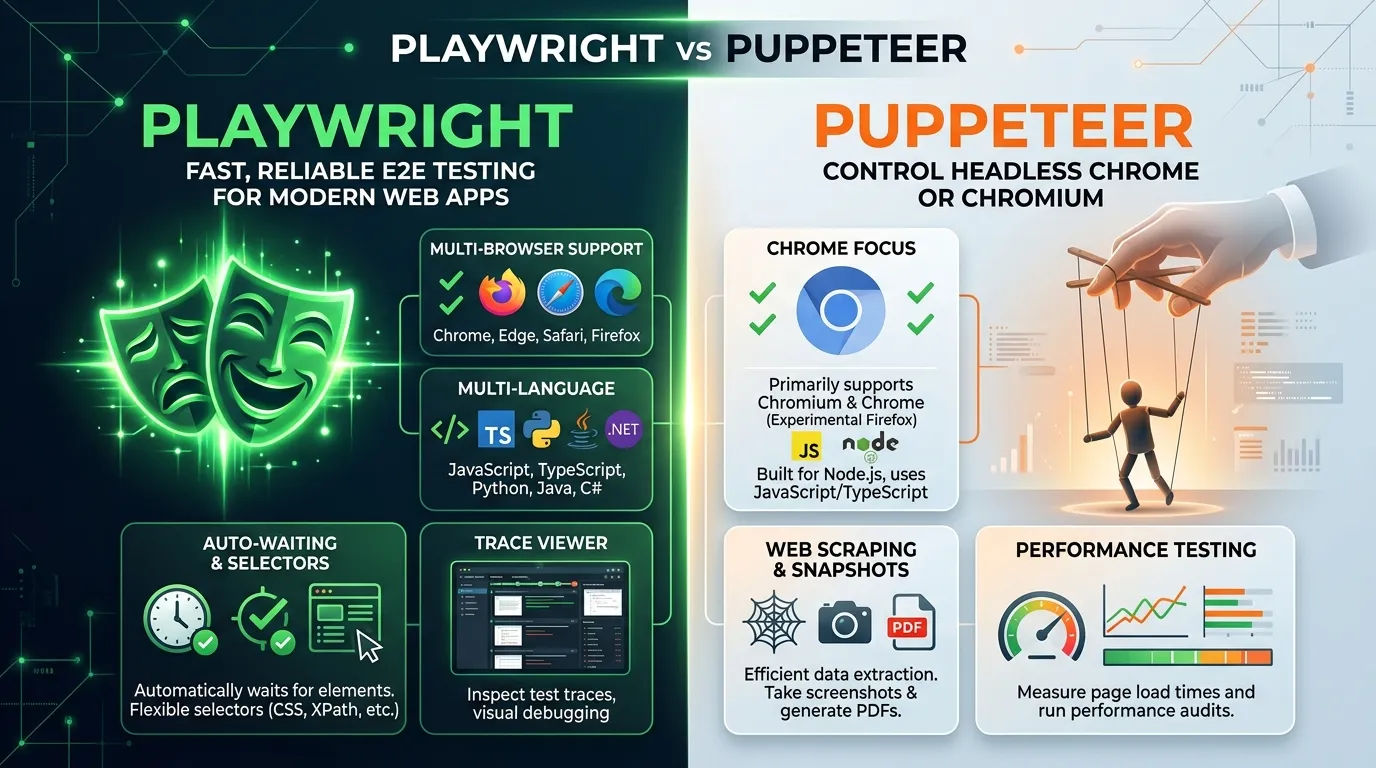
- Puppeteer: Primarily focused on Chromium-based browsers (Chrome and Edge). While it has an experimental version for Firefox, it is not its primary focus.
- Playwright: Built from the ground up for cross-browser support. It supports Chromium, Firefox, and WebKit (the engine behind Safari) using a single, unified API.
Winner: Playwright. For modern web applications that need to work across all platforms, Playwright's native support for all major engines is a clear advantage.
2. Feature Richness and Built-in Tools
Playwright was designed to solve many of the common pain points that users experienced with Puppeteer and Selenium.
- Auto-waiting: Playwright automatically waits for elements to be ready (visible, clickable, etc.) before performing actions, which drastically reduces test flakiness.
- Trace Viewer: Playwright's Trace Viewer is a post-test inspection tool that records network requests, DOM snapshots, and console logs, making debugging a breeze.
- Fixtures and Hooks: Playwright's powerful fixture system allows for advanced dependency injection and clean state management.
- Network Interception: Both frameworks allow you to intercept and mock network requests, but Playwright's API is generally considered more ergonomic for complex scenarios.
Winner: Playwright. Its built-in feature set is tailor-made for the needs of modern QA engineers.
3. Architecture and Performance
Both frameworks use the CDP (Chrome DevTools Protocol) for interacting with Chromium-based browsers. However, Playwright uses more efficient communication channels for Firefox and WebKit.
- Isolation: Both provide excellent browser context isolation, allowing you to run multiple tests in the same browser instance without state leakage.
- Speed: In most benchmark tests, Playwright and Puppeteer are neck-and-neck in terms of raw execution speed. Playwright's overhead is slightly higher, but its auto-waiting logic often makes tests run faster overall by avoiding unnecessary sleep commands.
Winner: Tie. Both are incredibly fast and efficient compared to legacy tools like Selenium.
4. Community and Ecosystem
Puppeteer has been around longer and has a massive community and a wealth of existing tutorials and integrations. Playwright, however, has seen explosive growth and is now the preferred choice for many major organizations.
- Documentation: Playwright's documentation is widely considered the best in the industry, with clear examples for both JavaScript, TypeScript, Python, Java, and C#.
- Third-party Integration: Most modern testing tools (like K6, Artillery, and various CI/CD plugins) support both frameworks equally well.
Winner: Tie. Puppeteer has more legacy resources, but Playwright has better multi-language documentation and modern momentum.
5. When to Choose Which?
Choose Puppeteer if:
- You are only testing for Chrome/Edge.
- You are doing specialized web scraping that relies on specific CDP features.
- You are already heavily invested in an existing Puppeteer suite and don't need cross-browser support.
Choose Playwright if:
- You need to test for Safari (WebKit) or Firefox.
- You want a unified API for multiple languages (not just JS/TS).
- You want the best debugging experience with the Trace Viewer.
- You are building a large, complex automation suite and need powerful state management features (Fixtures).
Conclusion
While Puppeteer remains a solid choice for simple tasks and focused Chromium testing, Playwright has emerged as the clear leader for comprehensive, enterprise-grade web automation. Its focus on cross-browser reliability, developer experience, and modern testing patterns makes it the go-to framework for 2026.
Frequently Asked Questions
Yes, and the process is relatively straightforward because the APIs are quite similar. You'll mostly be changing package imports and updating some selector logic.



