
Introduction
Modern web applications are becoming increasingly complex. With frequent updates, dynamic interfaces, and multiple browser environments, testing these applications efficiently can quickly become challenging. Writing automation scripts without proper structure often leads to messy code, difficult maintenance, and unreliable tests.
This is where the playwright page object model becomes incredibly useful.
The Page Object Model POM is a design pattern widely used in test automation frameworks to improve code structure, readability, and maintainability. When implemented in Playwright, it helps testers and developers organize automation scripts by separating page logic from test logic.
Instead of writing all automation commands inside test files, the Page Object Model organizes interactions with web pages into reusable classes. This makes automation frameworks scalable and easier to maintain.
In this guide you will learn
- What the Page Object Model is
- Why playwright page object model is essential for scalable automation
- How to implement POM step by step in Playwright
- How to structure a Playwright automation project using POM
- Best practices used by professional automation engineers
Whether you are a student learning test automation, a QA engineer building scalable frameworks, or a developer interested in clean test architecture, this guide will help you understand and implement the Playwright Page Object Model effectively.
What is Page Object Model
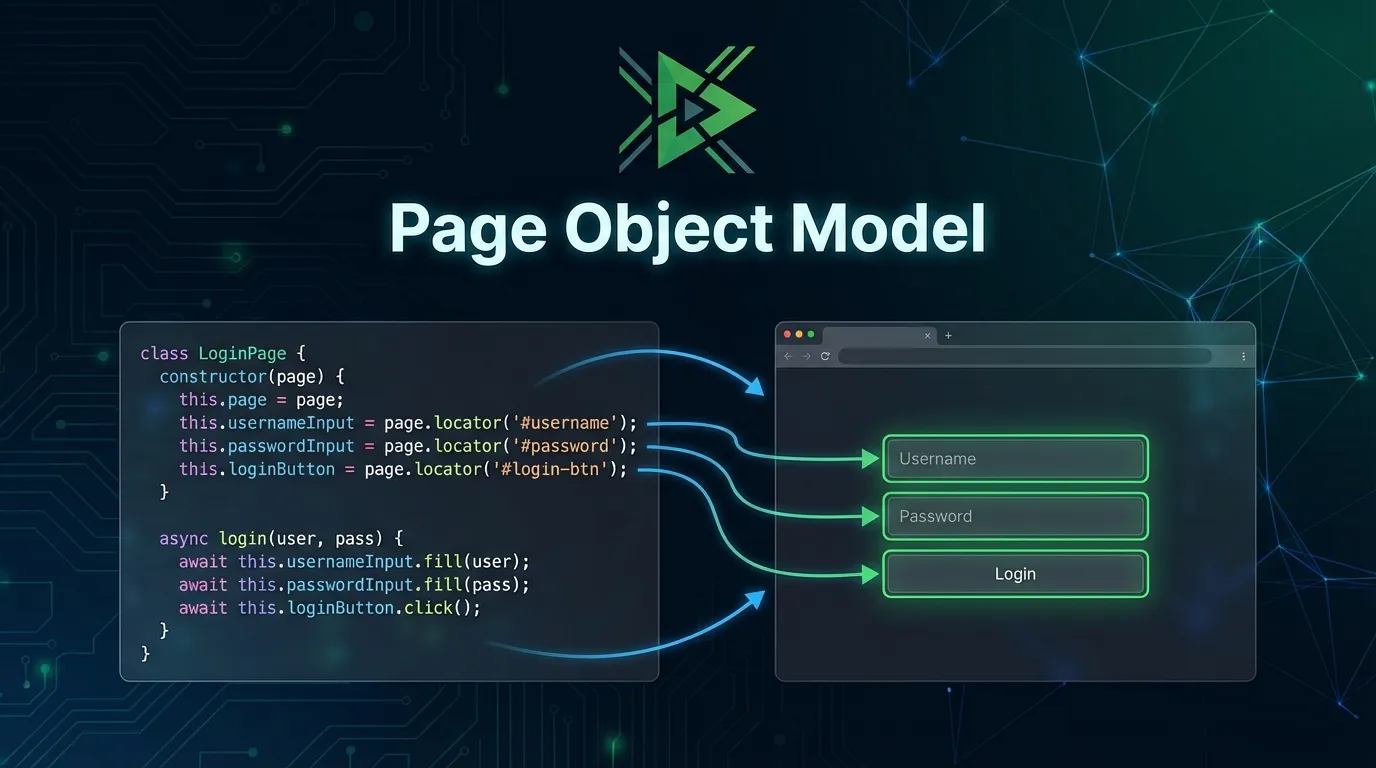
The Page Object Model POM is a software design pattern used in test automation to represent web pages as objects.
In this model
- Each web page is represented as a class
- Page elements are defined as variables
- Page actions are defined as methods
This approach separates test logic from page interactions which makes automation scripts cleaner and easier to maintain.
Benefits of Playwright Page Object Model
Using the playwright page object model offers several advantages for automation projects.
Improved Code Organization
- Separates page interactions from test scripts
- Makes automation frameworks structured and easier to understand
Better Maintainability
- UI changes require updates in only one place
- Reduces maintenance effort across multiple tests
Reusable Components
Common actions can be reused across multiple test cases such as
- Login actions
- Navigation flows
- Form submissions
Scalable Automation Framework
Large automation projects become easier to manage with the Page Object Model.
Better Collaboration
Developers and QA engineers can work on different components without conflicts.
Playwright Project Structure with Page Object Model
Example project structure
- playwright project
- pages
- loginPage ts
- dashboardPage ts
- tests
- login spec ts
- playwright config ts
- package json
This structure keeps automation frameworks organized and easy to maintain.
Creating a Page Object in Playwright
Typical page object structure
- Class representing a page
- Methods representing page actions
- Variables representing page elements
Example logical structure
- LoginPage class
- navigateToLogin method
- login method
This class represents the login page and encapsulates all actions related to that page.
Writing Tests Using Page Object Model
Typical test flow using Page Object Model
- Create page object instance
- Navigate to the page
- Perform required actions
- Verify expected results
Example workflow
- Create login page object
- Open login page
- Enter user credentials
- Click login button
- Verify dashboard page
This approach keeps test files clean and easy to read.
Best Practices for Playwright Page Object Model
Use Meaningful Method Names
Examples
- loginUser
- openDashboard
- submitForm
Keep Page Objects Simple
Page objects should contain only page related logic.
Avoid Hard Coding Data
Store test data separately from page objects.
Use Stable Selectors
Prefer stable identifiers such as
- data test id attributes
- meaningful element identifiers
Organize Large Projects
Recommended folder structure
- pages
- tests
- fixtures
- utilities
Playwright Page Object Model vs Traditional Automation
Comparison
Traditional Automation
- Messy test scripts
- Limited code reuse
- Difficult maintenance
- Poor scalability
Playwright Page Object Model
- Organized framework
- High reusability
- Easier maintenance
- Better scalability
Advanced Page Object Model Techniques
Base Page Classes
Common reusable methods
- openURL
- takeScreenshot
- waitForElement
Component Based Page Objects
Reusable components can include
- Navigation bar
- Sidebar
- Footer
Data Driven Testing
Combine Page Object Model with data driven testing for flexible automation frameworks.
Career Benefits of Learning Page Object Model
Understanding the playwright page object model is an important skill for automation engineers.
Common job roles include
- QA Automation Engineer
- Software Test Engineer
- Software Development Engineer in Test
- Automation Architect
Many companies expect automation engineers to design scalable frameworks using the Page Object Model.
Short Summary
The playwright page object model is a design pattern that improves automation frameworks by separating page interactions from test logic. It makes automation scripts cleaner, reusable, and easier to maintain.
Conclusion
Automation frameworks become difficult to maintain when test scripts grow large and complex. Implementing the Playwright Page Object Model introduces structure, reusability, and scalability.
By separating page logic from test logic, teams can build automation frameworks that are easier to maintain and expand over time.
Frequently Asked Questions
Page Object Model in Playwright is a design pattern where each web page is represented as a class containing page elements and actions.



