
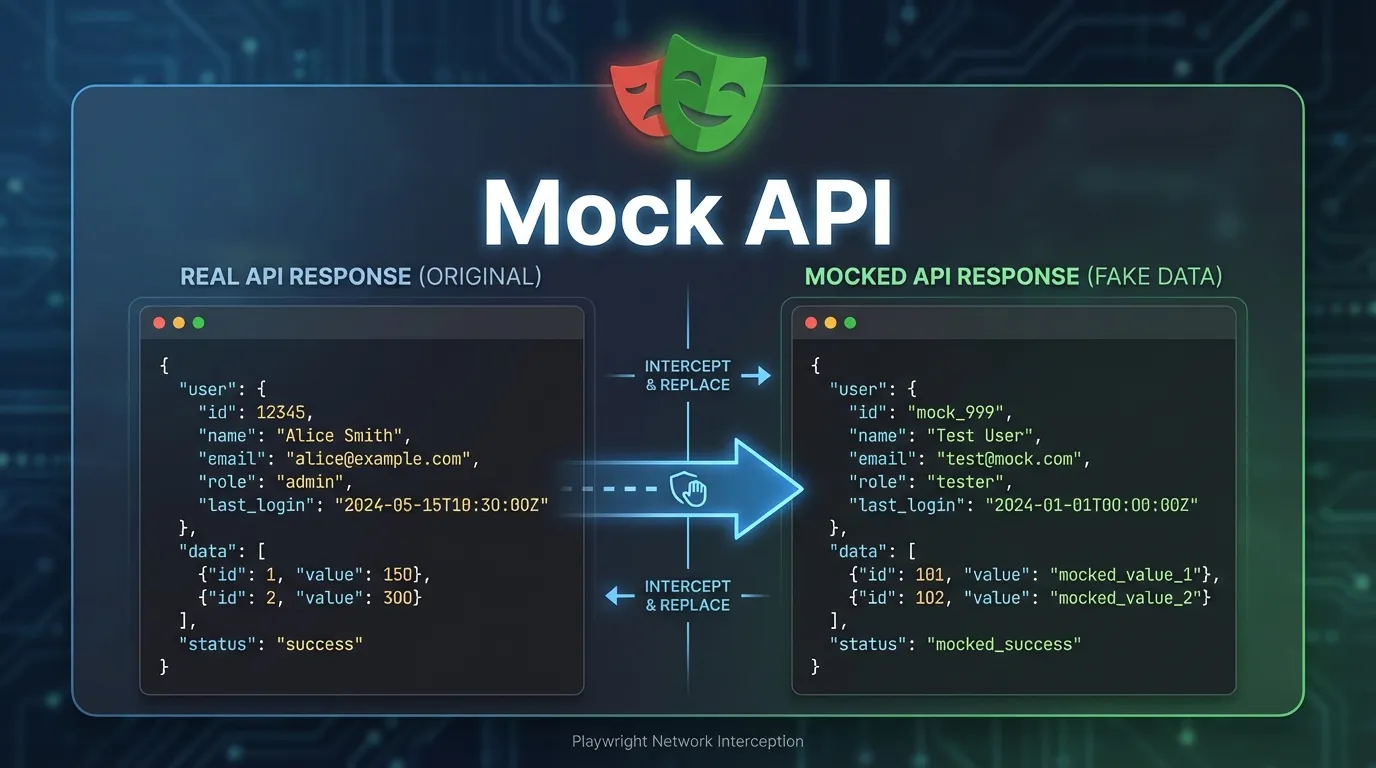
Introduction
Modern web applications rely heavily on APIs to fetch and update data. When a user loads a dashboard, logs in, searches for products, or updates account details, the browser communicates with backend services through API requests. These APIs are responsible for delivering the data that powers the user interface.
However, during automation testing, relying on real APIs can create challenges. APIs may be slow, unstable, unavailable, or dependent on external systems. This can cause automated tests to fail even when the application itself works correctly.
This is where playwright api mocking becomes extremely useful.
Playwright allows testers to mock API responses, meaning they can intercept network requests and provide custom responses without contacting the real server. This makes tests faster, more reliable, and easier to control.
In this comprehensive guide on Mock API Responses in Playwright, you will learn:
- What API mocking is and why it is important
- How playwright api mocking works
- How to intercept network requests in Playwright
- How to create mock responses for APIs
- Best practices for stable automation testing
Whether you are a student learning automation testing, a QA engineer building test frameworks, or a developer validating application behavior, this guide will help you master API mocking using Playwright.
API mocking offers several advantages for automation testing.
Remove Backend Dependency
Tests become independent of backend services.
This ensures consistent and reliable test execution.
Faster Test Execution
Mock responses are instant because they do not involve real server communication.
Test Edge Cases
Mocking allows testing rare scenarios such as:
- Server failures
- Empty responses
- Unexpected data formats
These scenarios are difficult to reproduce with real APIs.
Before mocking an API response, the request must be intercepted.
Example:
await page.route('**/api/users', route => {
route.continue()
})
This captures requests that match the specified URL pattern.
Steps performed:
1 Detect request
2 Allow request to continue
This allows inspection of the request.
Mocking JSON responses is common when testing applications.
Example:
await page.route('**/api/products', route => {

route.fulfill({
status: 200,
contentType: 'application/json',
body: JSON.stringify({
products: [
{ id: 1, name: 'Mock Product' }
]
})

})

})
This simulates an API returning product data.
This allows testing UI behavior without relying on real backend services.
Sometimes it is necessary to block requests completely.
Example:
await page.route('**/analytics', route => route.abort())
This prevents the request from reaching the server.
Blocking unnecessary requests can speed up tests.
Use Cases for API Mocking
API mocking is useful in many testing scenarios.
Common use cases include:
- Testing UI without backend availability
- Simulating slow APIs
- Simulating server failures
- Testing empty API responses
- Creating predictable test data
These capabilities make playwright api mocking essential for reliable automation.
Best Practices for API Mocking
Following best practices ensures reliable test automation.
Mock Only Required APIs
Intercept only APIs relevant to the test.
Keep Mock Data Realistic
Use data structures similar to real APIs.
Test Both Mocked and Real APIs
Occasionally run tests with real APIs to ensure integration works.
Use Clear URL Patterns
Avoid overly broad interception patterns.
Short Summary
Playwright api mocking allows testers to intercept network requests and return custom responses instead of real API responses. This enables faster, more reliable automation testing by removing dependencies on backend services.
FAQs
What is Playwright API mocking
Playwright API mocking allows intercepting API requests and returning custom responses.
Why mock APIs in automation testing
Mocking removes backend dependency and improves test reliability.
How does Playwright mock API responses
Playwright uses page.route and route.fulfill methods.
Can Playwright simulate API failures
Yes Playwright can simulate server errors and failure responses.
Is API mocking useful for UI testing
Yes it allows testing UI behavior without relying on real APIs.


