
Introduction
Imagine launching a new website or application only to see it crash when thousands of users try to access it simultaneously. This situation is more common than many businesses expect. Even well-designed applications can fail under heavy traffic if their performance is not properly tested.
This is where performance testing becomes essential.
Performance testing evaluates how a system behaves under different levels of load, ensuring that applications remain stable, responsive, and scalable. One of the most popular tools used for this purpose is Apache JMeter.
JMeter is a powerful open-source tool designed to test the performance of web applications, APIs, databases, and other services. It allows testers and developers to simulate multiple users interacting with an application simultaneously and measure how the system performs under stress.
In this guide on performance testing JMeter, you will learn:
- What performance testing is and why it matters
- What Apache JMeter is and how it works
- Key types of performance testing
- Step-by-step instructions for running tests with JMeter
- Real-world examples of performance testing
- Best practices for successful performance testing
Whether you are a beginner exploring testing concepts or a professional working in DevOps or QA automation, this article will help you understand how JMeter can improve application performance and reliability.
What is Apache JMeter?
Apache JMeter is an open-source performance testing tool developed by the Apache Software Foundation.
It is widely used to test the performance of:
- web applications
- APIs
- databases
- FTP servers
- microservices
JMeter allows testers to simulate thousands of users interacting with an application simultaneously.
Key Features of JMeter
Apache JMeter provides several powerful features for performance testing.
Some of the most important include:
- load testing capabilities
- distributed testing support
- graphical test plan interface
- detailed performance reports
Because JMeter is open source, it is widely used by developers, QA engineers, and DevOps teams.
How JMeter Works
JMeter simulates virtual users that send requests to the application being tested.
These virtual users perform actions such as:
- sending HTTP requests
- accessing APIs
- interacting with databases
JMeter then collects performance metrics including response time and error rates.
JMeter Architecture
JMeter follows a client-server architecture.
Key components include:
- Test Plan
- Thread Group
- Samplers
- Listeners
Each component plays a role in designing and executing performance tests.
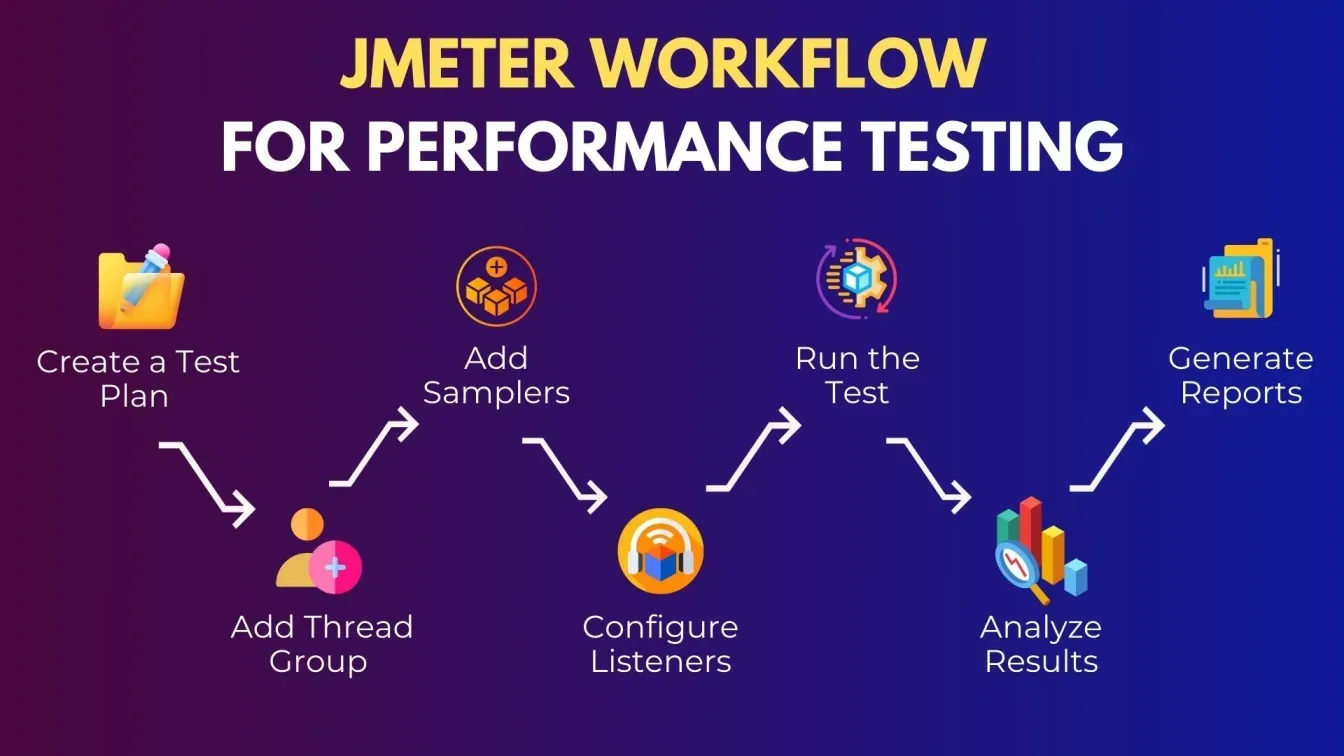
Step-by-Step Guide to Performance Testing with JMeter
Follow these steps to perform a basic performance test using JMeter.
Step 1 Install JMeter
Download JMeter from the official Apache website.
Extract the package and launch JMeter.
Step 2 Create a Test Plan
Open JMeter and create a new test plan.
Add a thread group to simulate users.
Step 3 Add HTTP Requests
Add an HTTP Request sampler to send requests to the application.
Example request:
GET https://example.com
Step 4 Add Listeners
Add listeners such as Summary Report or Graph Results to analyze performance.
Step 5 Run the Test
Execute the test plan to simulate user traffic.
Step 6 Analyze Results
Review response time, throughput, and error rate metrics.
Benefits of Using JMeter for Performance Testing
JMeter offers several advantages for testing application performance.
Open Source and Free
JMeter is completely free and widely supported by the community.
Highly Scalable
It can simulate thousands of concurrent users.
Supports Multiple Protocols
JMeter supports:
- HTTP
- FTP
- JDBC
- REST APIs
Integration with DevOps Pipelines
JMeter integrates with CI CD tools to automate performance testing.
Best Practices for Performance Testing with JMeter
Following best practices helps improve testing accuracy.
Use Realistic Test Data
Simulate real user behavior for accurate results.
Start with Small Tests
Gradually increase the number of virtual users.
Monitor Server Performance
Track CPU, memory, and database usage during tests.
Run Tests in Production-Like Environments
Testing in realistic environments improves reliability.
Short Summary
Performance testing helps ensure applications remain stable and responsive under heavy traffic. Tools like Apache JMeter allow testers to simulate thousands of users and analyze system performance metrics.
By using performance testing JMeter, organizations can detect bottlenecks early and improve application reliability.
Frequently Asked Questions
Performance testing evaluates how an application behaves under different levels of load and traffic.


