
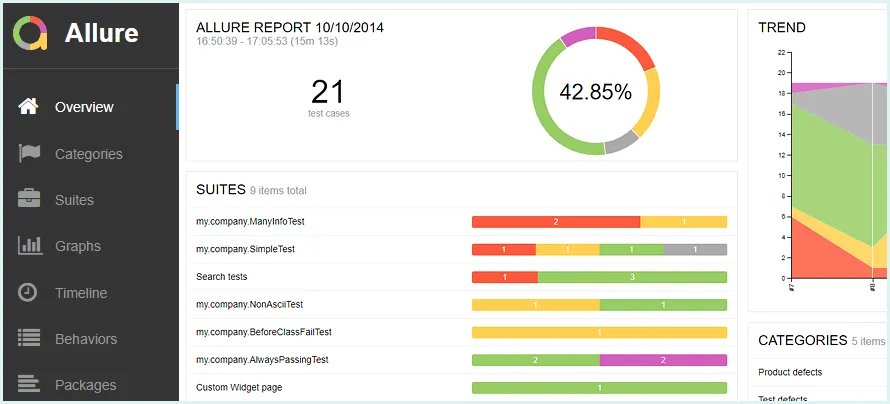
In the world of test automation, reporting is just as important as writing or executing tests. Without clear insights, test reports lose meaning—and teams miss critical failures, slow down debugging, and delay releases. This is where Allure Reports shine.
Allure is one of the most powerful and elegant reporting frameworks available today. It brings your test results to life with visually appealing dashboards, interactive charts, step logs, screenshots, and detailed breakdowns. Whether you're using Selenium, Cypress, Playwright, API testing tools, or CI/CD systems, Allure fits seamlessly into your workflow.
Allure Reports is an open-source test reporting tool developed by Qameta Software. It is widely used in automation frameworks to produce visually appealing, detailed, and interactive test execution reports.
Key Features of Allure:
- Clean and modern UI
- Interactive charts and metrics
- Step-by-step test execution logs
- Screenshot support
- Works with TestNG, JUnit, Pytest, Cypress, Playwright, Robot Framework, and more
- CI/CD integration support
Allure collects test metadata and execution data using:
- Allure adapters
- Allure annotations
- Test attachments
These components store detailed information that Allure uses to generate structured and interactive HTML reports.
For Windows (Scoop)
scoop install allure
For Mac (Brew)
brew install allure
For Linux
sudo apt-add-repository ppa:qameta/allure
sudo apt-get update
sudo apt-get install allure
Verify installation:
allure --version
For TestNG (Java)
<dependency>
  <groupId>io.qameta.allure</groupId>
  <artifactId>allure-testng</artifactId>
  <version>2.21.0</version>
</dependency>
For JUnit 5
<dependency>
  <groupId>io.qameta.allure</groupId>
  <artifactId>allure-junit5</artifactId>
  <version>2.21.0</version>
</dependency>
For Pytest
pip install allure-pytest
For Cypress
npm install -D @shelex/cypress-allure-plugin
Common Annotations
@Epic
Groups high-level features
@Feature
Identifies modules
@Story
Organizes flows
@Step
Logs each test step
@Attachment
Adds screenshots, logs, or files
Step 4 — Generate Allure Results
Run tests:
mvn clean test
This generates:
allure-results/
Understanding the Allure Report Dashboard
Attaching Screenshots & Logs in Allure
Using Allure with Selenium Tests
Typical workflow:
- Run Selenium tests
- Capture screenshot on failure
- Use @Step for detailed logs
- Generate the Allure report
Jenkins
- Install Allure plugin
- Add "Allure Report" post-build step
- Set results path:
allure-results
GitHub Actions
- name: Generate Allure Report
  run: allure generate allure-results -o allure-report --clean
Common Issues & Fixes
Short Summary
Allure Reports provide a powerful, interactive, and professional way to visualize test automation results. With features like screenshots, logs, dashboards, and CI/CD integration, Allure makes debugging easier and improves overall transparency for QA teams.
FAQs
1. What is Allure Report used for?
Allure is used for generating rich, interactive test automation reports.
2. Does Allure support screenshots?
Yes, screenshots and logs can be attached.
3. Can Allure be used with Selenium?
Yes, Allure integrates seamlessly with Selenium, TestNG, JUnit, and CI/CD pipelines.
4. Is Allure free?
Yes, Allure is open-source.
5. What languages does Allure support?
Java, Python, JavaScript, Ruby, Kotlin, and more.


