
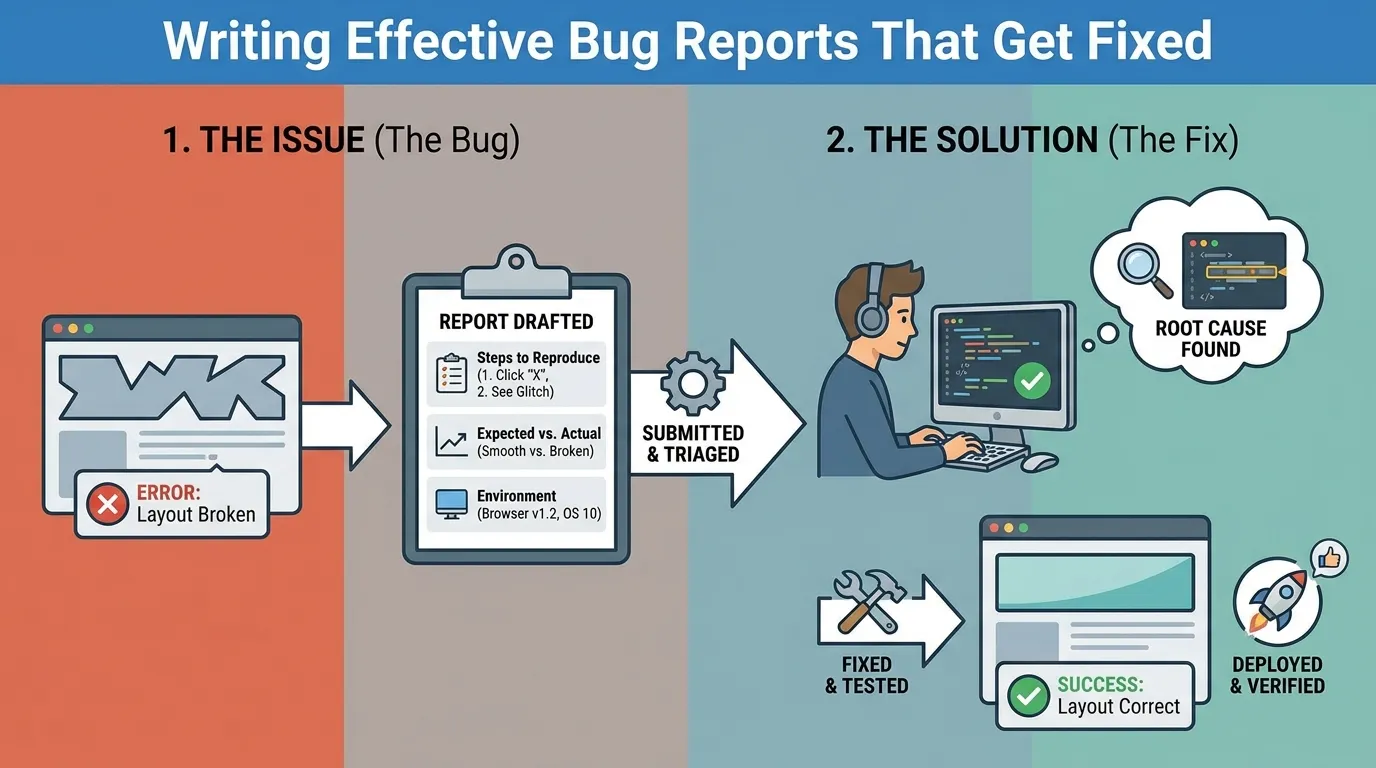
Writing Effective Bug Reports That Get Fixed: The 2026 Engineer’s Guide
In the high-speed software development environments of 2026, a bug report is much more than a simple "It’s broken" message. It is a technical hand-off between a Quality Engineer and a Developer. In an era where deployments happen every hour, a poorly written bug report isn't just a nuisance—it’s a massive waste of expensive engineering resources. Conversely, an "effective" bug report is one that provides enough context and data for a developer to identify, reproduce, and fix the issue without a single "clarification" meeting.
This guide explores the anatomy of a world-class bug report in 2026, focusing on technical depth, data automation, and the psychology of developer communication.
1. The Core Philosophy: "Eliminate the Loop"
The primary goal of a bug report is to eliminate the feedback loop. Every time a developer has to ask, "Which browser were you using?" or "Can you attach the logs?", the time-to-fix is delayed by hours or even days.
1. The Zero-Ambiguity Standard
- The Strategy: Assume the developer has zero prior knowledge of the feature and is currently multitasking on three other high-priority tasks.
- The Content: Provide every piece of information required to replicate the failure state before they ask.
2. The "Fix-it-Now" Metadata
In 2026, we include high-resolution metadata that allows for "One-Click Debugging." This includes the exact Git commit hash, the container ID of the microservice, and a deep link to the OpenTelemetry trace.
2. The Anatomy of a World-Class Bug Report
A perfect bug report in 2026 follows a strict, data-dense structure.
1. The "Action-Oriented" Title
- Bad: "Payments are broken."
- Good: "[Checkout] Stripe API returns 503 error when processing CAD currency on Chrome 124."
- Why: The title should be enough for a lead engineer to triage the issue during a stand-up meeting without opening the ticket.
2. Steps to Reproduce (The Scientific Method)
Steps must be precise and atomic.
- Login as
test_user_78(Regional Tenant: Germany). - Add
Item_ABCto the cart. - Proceed to checkout and select "Bank Transfer" as the payment method.
- Click "Confirm Order."
- Requirement: If the bug is "Flaky" (intermittent), specify the approximate "Success Rate" (e.g., "Occurs 30% of the time during heavy load").
3. Expected vs. Actual Results
- Expected: Order is confirmed and the user is redirected to the
/successpage. - Actual: Page hangs for 30 seconds followed by a "Service Unavailable" banner.
3. Data Enrichment: Beyond Screenshots
In 2026, a screenshot is a secondary piece of evidence. The primary evidence is System State.
1. The "Snapshot of State"
Attach a JSON dump of the application’s state at the moment of failure.
- Browser: Redux store, LocalStorage, and Cookie headers.
- Mobile: Device logs (Logcat/Syslog), battery level, and network signal strength.
2. Traceability and Observability Links
- Tracing: Provide a link to the Jaeger/Honeycomb trace. This allows the developer to see the "Path of the Bug" through the backend microservices.
- Logs: Provide a deep link to the Datadog/Logz.io search query filtered by the specific
request-idassociated with the failure.
3. Video Proof (with Annotations)
Use screen-recording tools (like Loom or Cleanshot) to show the bug in action. A 15-second video is often worth 1,000 words of "Steps to Reproduce."
4. Triage and Prioritization (The MoSCoW Method)
In a massive enterprise backlog, not all bugs are created equal. You must assign an objective priority.
- P0 (Critical): System-wide crash, data loss, or security vulnerability. (Fix immediately).
- P1 (High): Major feature is unusable, but a workaround exists. (Fix in current sprint).
- P2 (Medium): Minor functional issue or UI inconsistency. (Fix in next sprint).
- P3 (Low): Nuance/Typos/Cosmetic issues. (Fix as time permits).
The "Impact" Description
Don’t just say it’s "High priority." Explain the Business Cost: "This bug prevents 15% of European users from completing their orders, estimated loss of $20k/day."
5. The Psychology of the Bug Report
Engineering is a team sport. How you communicate determines how fast your bug gets fixed.
1. Be Objective, Not Accusatory
- Avoid: "Your code is failing to handle the API response."
- Use: "The API response appears to be returning an unexpected format in this specific scenario."
- Why: Developers are more likely to prioritize bugs that feel like a "Shared Puzzle" rather than a "Personal Failure."
2. The "Pre-Fix" Investigation
If you have the skills, do 5 minutes of extra research.
- QA Contribution: "I checked the logs and noticed the 'Tax-Service' is timing out. It might be related to the recent DB migration in the EU region."
- Result: You’ve just saved the developer 30 minutes of investigation, making you an invaluable partner.
6. AI-Augmented Bug Reporting in 2026
Modern QA teams use AI to "Enrich" their reports automatically.
- Auto-Formatting: Using an LLM to take a voice memo from a tester and turn it into a perfectly formatted Markdown ticket.
- Predictive Assigning: The system analyzes the "Modified Code" and automatically assigns the bug to the developer who most recently touched those files.
- Root Cause Analysis (RCA) Suggestion: AI compares the current failure against historical bug data and suggests: "This looks similar to Bug #452 fixed in January; check the buffer overflow logic."
7. Metrics of Reporting Success
| Metric | Junior Tester | Senior Quality Engineer |
|---|---|---|
| Reproducibility Rate | 60% | 98%+ |
| Clarification Requests | 3 / Bug | 0 / Bug |
| Time-to-Triage | 4 Hours | 15 Minutes |
| Fix Rate (P0/P1) | Passive | 100% (Guaranteed by depth) |
| Developer Sentiment | "Who wrote this?" | "I love getting bugs from them." |
2026 Bug Reporting Checklist
- Clear Title: Does the title summarize the what, where, and when?
- Atomic Steps: Can someone follow your steps and see the bug in 60 seconds?
- Expected/Actual: Did you clearly define what the success state looks like?
- Environment Data: Did you include OS, Browser, App Version, and Tenant ID?
- Observability Links: Is there a link to a Trace or a Log entry?
- State Dump: Did you attach the JSON payload of the application state?
- Visual Evidence: Is there a video or a screenshot?
- Business Impact: Did you explain how this bug affects the user or the revenue?
Summary
- Data is the Cure: The more raw data (logs, traces, state) you provide, the faster the fix.
- Scientific Reproduction: If a developer can't reproduce it, they can't fix it. Be precise.
- Prioritize with Business Logic: Always link a bug’s severity to its impact on the company’s bottom line.
- Collaborate, Don't Criticize: Treat the developer as a partner in solving a complex system puzzle.
- Leverage AI Enrichment: Use automated tools to capture state and format your reports for maximum clarity.
- The "One-Look" Rule: A lead engineer should understand the core of the problem by looking at the title for 5 seconds.
Conclusion
The art of writing effective bug reports is a core competency for any elite Quality Engineer in 2026. In our world of automated pipelines and microsecond latency, the "Human" factor—the ability to clearly communicate a system failure—remains the bridge between detection and resolution. A great bug report is a gift to a developer; it respects their time, simplifies their work, and ultimately makes the software better for every user. By moving beyond simple text and embracing the full spectrum of observability data, QA professionals can move from being "Checkers" to being "Systems Experts" who drive engineering excellence.
FAQs
1. What is the most important part of a bug report? The "Steps to Reproduce." If the developer cannot see the bug on their own machine, they are statistically unlikely to fix it.
2. Why is "Actual vs. Expected" necessary? Because what you think is a bug might actually be the "Intended Behavior." Clearly stating the discrepancy prevents time-consuming misunderstandings about requirements.
3. What is a "State Dump"? A capture of the application’s internal variables (Redux, LocalStorage, etc.) at the exact moment the error occurred.
4. How do I report a "Flaky" bug? By specifying the reproduction rate (e.g., "Occurs 1 out of 5 times") and attempting to identify any external factors like system load or specific network conditions.
5. Should I include a screenshot for every bug? For UI issues, yes. For backend/API issues, a link to a log trace is significantly more valuable than a screenshot of an error message.
6. What is "MoSCoW" prioritization? A framework standing for Must-have, Should-have, Could-have, and Won't-have, used to categorize the urgency of fixes.
7. How does "OpenTelemetry" help with bug reports? It provides a "Trace ID" that allows a developer to see the request as it traveled through every single backend service, pinpointing exactly where the failure started.
8. Is "High Priority" the same as "High Severity"? No. Severity is the technical impact (e.g., a crash). Priority is the business urgency (e.g., a typo on the CEO's profile page might be low severity but high priority).
9. What is "Duplicate Checking"? The process of searching existing tickets to ensure you aren't reporting something that another tester has already found.
10. How do I report a security vulnerability? In private. Never post security bugs (PII leakage, Auth bypass) in public channels or standard backlogs without ensuring you follow your company’s "Responsible Disclosure" policy.
11. Can a bug report be "Too Big"? Yes. Avoid including 50MB of irrelevant logs. Instead, use deep links to specific, filtered log entries in your observability tools.
12. What is "Jira Hygene"? The practice of keeping bug reports updated with the latest findings, closing them when fixed, and ensuring all metadata fields are accurately filled.
13. Why use video instead of images? Because video captures "State Changes" and animations that a static image cannot, such as a button that clicks but doesn't trigger a change.
14. What if I find the fix myself? Include it in the bug report! Mentioning the specific file or line of code you suspect makes the developer’s life easier and builds your reputation.
15. How do I handle a bug that only happens in "Production"? By providing the "Trace ID" and "Log Link" from the production environment (ensuring PII is masked) and documenting the exact user demographics (region, device) impacted.


