
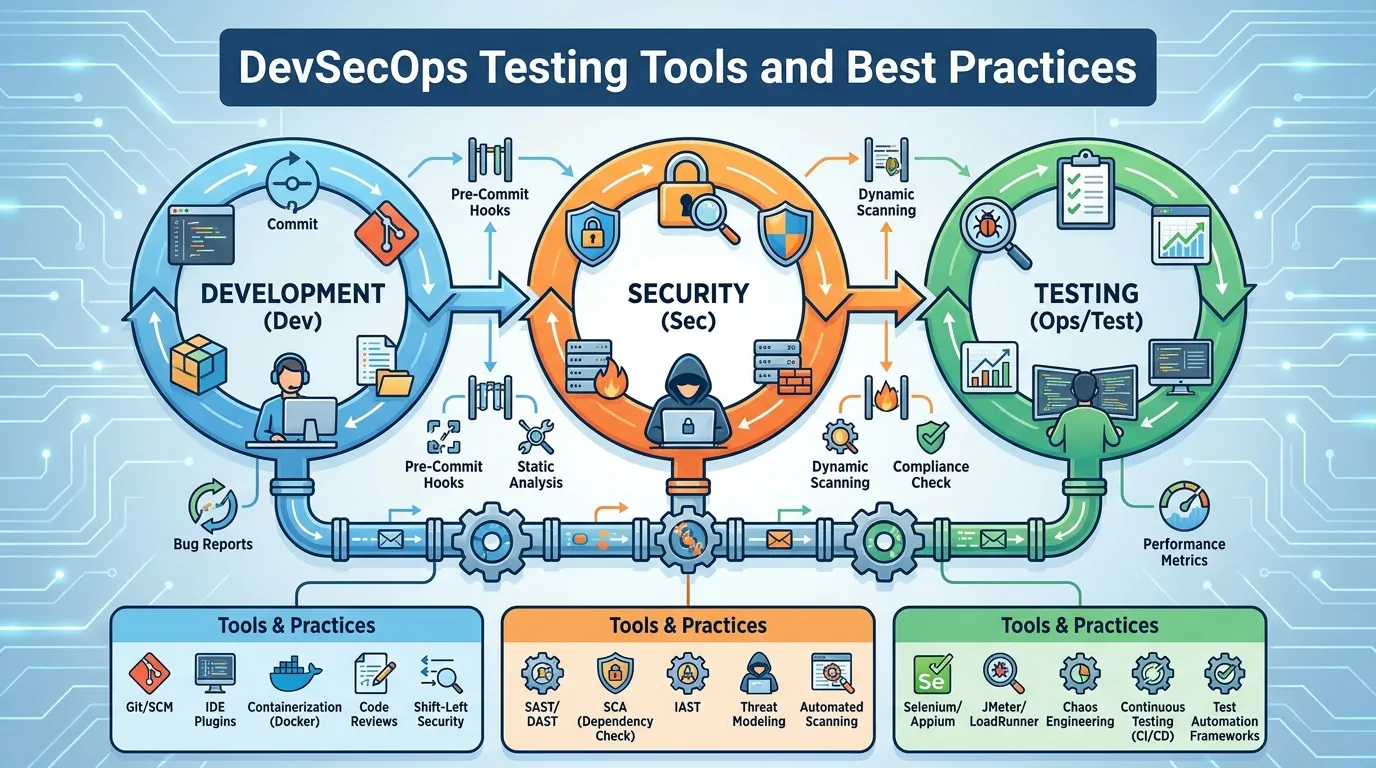
DevSecOps Testing Tools and Best Practices
For two decades, software development followed a rigid, siloed path. Developers wrote the code, Quality Assurance (QA) tested it for bugs, and right before the scheduled release, the Security team conducted a penetration test. This process was agonizingly slow. When the security team inevitably found a critical flaw, the release was halted, the code was sent back to the developers, and the entire business groaned under the weight of missed deadlines and friction.
With the advent of Agile and DevOps, companies began releasing code not once a month, but thousands of times a day. The traditional security model simply could not keep up; it became a massive bottleneck. The solution was "DevSecOps"—the philosophy of embedding security testing directly into the fast-moving developer workflows rather than treating it as a final hurdle. By 2026, relying solely on end-of-cycle penetration testing is a relic of the past. In this authoritative guide, we will explore the cultural mandate to "Shift Left," deconstruct the core testing pillars of SAST, DAST, and SCA, and analyze the most powerful devsecops testing tools consolidating the modern security landscape.
Why "Shift Left" Requires a Cultural Change
The foundational concept of DevSecOps testing is to "Shift Left." On a timeline where development begins on the left and production deployment is on the right, security testing must shift as far left as possible.
The Economics of Shifting Left
The core argument for DevSecOps is financial. If a developer accidentally writes a SQL injection vulnerability, the cost to fix it varies exponentially based on when it is discovered.
- Discovered in the IDE (Shift Left): Cost to fix: $10 and 5 minutes. The developer simply rewrites that line of code before hitting save.
- Discovered during QA: Cost to fix: $500. A ticket must be created, prioritized, and sent back to the developer, breaking their current flow.
- Discovered in Production: Cost to fix: $10,000+. The code requires an emergency hotfix, massive regression testing, and deployment downtime.
- Discovered by a Hacker: Cost: Millions of dollars, reputational ruin, and regulatory fines.
Breaking the Silos
Implementing devsecops testing tools is easy; changing the culture is hard. Security cannot be a "Department of No" that hovers over developers with spreadsheets of vulnerabilities. Developers must be empowered to own the security of their code. This means security testing tools must integrate seamlessly into the tools the developers already use (like VS Code, GitHub, and Jira), providing instant, actionable feedback in developer-centric language, rather than dense, cryptic security jargon.
The DevSecOps Toolchain Explained (SAST, SCA, DAST)
A robust DevSecOps pipeline utilizes different automated tools at very specific stages of the development lifecycle.
Static Application Security Testing (SAST)
SAST operates on the far left. It is essentially a grammar checker for security vulnerabilities. It scans the raw source code (or bytecode) before the application is even compiled or running.
- How it works: A developer creates a Pull Request in GitHub. A SAST tool instantly scans the new code looking for hardcoded passwords, dangerous function calls (like
eval()), and buffer overflow potentials. - Pros: It finds exactly which line of code is broken, making remediation incredibly fast.
- Cons: SAST is notorious for "False Positives" (flagging secure code as insecure), which causes developer alert fatigue.
Software Composition Analysis (SCA)
Modern applications are rarely written from scratch; 80% of a typical codebase consists of free, open-source libraries (e.g., Log4j, React, OpenSSL). SCA tools test this software supply chain.
- How it works: Whenever a developer adds a new dependency, the SCA tool cross-references it against massive databases of known CVEs (Common Vulnerabilities and Exposures).
- The Crucial Question of "Reachability": Advanced 2026 SCA tools do not just yell at you because you imported a vulnerable library. They perform "Reachability Analysis" to mathematically determine if your application actually calls the specific vulnerable function inside that library. If it doesn't, the alert is deprioritized, saving the developer hours of useless patching.
Dynamic Application Security Testing (DAST)
DAST operates further to the right. It tests the application while it is actually running in a staging or testing environment. DAST is a "black box" test; it has no visibility into the source code.
- How it works: DAST tools act like automated hackers. They crawl the web application, clicking every button, filling out every form with malicious inputs (SQL injections, Cross-Site Scripting scripts), and observing how the application responds.
- Pros: DAST has very low false positives. If DAST successfully executes an exploit on the running application, the vulnerability is 100% real and exploitable.
Consolidating Noise with ASPM (Application Security Posture Management)
If a team implements SAST, SCA, and DAST correctly, they encounter a new, massive problem: Alert Fatigue. The SAST tool generates 2,000 alerts; the SCA tool generates 500 alerts; the DAST tool generates 150 alerts. A small development team is paralyzed by the noise.
By 2026, the indispensable core of the DevSecOps strategy is ASPM (Application Security Posture Management).
ASPM platforms do not inherently run their own scans. Instead, they ingest the data from all your other devsecops testing tools, deduplicate the findings, and violently prioritize them using "Business Context." If you have a critical vulnerability in a microservice, but the ASPM platform recognizes (via cloud correlation) that this specific microservice is an internal testing tool completely cut off from the public internet and containing no PII, the ASPM platform will automatically downgrade the severity of the alert. This allows developers to focus exclusively on the 10 critical vulnerabilities that actually touch the public internet, rather than drowning in 2,650 meaningless alerts.
Container and Supply Chain Security
Securing the code is only half the battle; DevSecOps must test the environments carrying that code.
Image Scanning
Before an application is pushed to production, it is typically packaged into a Docker container. Testing the container involves scanning the "Base Image" (the underlying operating system built into the container, like Alpine Linux) for known vulnerabilities. If a developer uses a heavily outdated version of Ubuntu as their base image, it doesn't matter how secure their custom Python code is; the server will be easily compromised.
The Software Bill of Materials (SBOM)
A major mandate in 2026 is supply chain transparency. Testing pipelines must automatically generate an SBOM—a comprehensive, machine-readable "ingredients list" detailing every single open-source library, version number, and license utilized within the application. If a massive zero-day vulnerability (like Log4Shell) drops on a Friday night, the security team simply queries their central SBOM repository to instantly know exactly which of their 500 microservices are running the vulnerable library, rather than scrambling to manually test every server.
Leading DevSecOps Platforms in 2026
The market is fiercely competitive, but a few key platforms have established themselves as enterprise standards.
1. Snyk
Snyk (pronounced "Sneak") built its reputation on extreme developer-centricity. Primarily functioning as an SCA and SAST platform, Snyk integrates directly into GitHub and developer IDEs. When Snyk detects a vulnerable library in a pull request, it doesn't just block the PR; it actively generates a "Fix PR" containing the exact line-of-code changes needed to upgrade the library to a secure version, allowing the developer to secure the code with a single click.
2. SonarQube
SonarQube is a staple of SAST and continuous code quality. It is universally used as a "Quality Gate" in CI/CD pipelines (like Jenkins or GitLab CI). SonarQube analyzes every commit for security hotspots, code smells, and technical debt. If the code coverage or security rating drops below the organization's required baseline, SonarQube definitively fails the CI/CD build, strictly preventing the bad code from advancing further down the pipeline.
3. Apiiro / Cycode (ASPM Leaders)
Platforms like Apiiro and Cycode are leading the ASPM revolution. They sit above the fray of individual scanners, ingesting data from Jira to the cloud provider, to map the entire software lifecycle. They provide true risk prioritization by understanding the context of the vulnerability in the real-world deployment map, acting as the central intelligence hub for the modern DevSecOps practice.
Step-by-Step: Integrating Security into CI/CD
Building a DevSecOps pipeline requires strategically placing these tools so they don't break developer momentum.
Step 1: Pre-Commit (Local IDE Validation)
Before a developer even commits code, a lightweight SAST engine runs locally in their VS Code environment. It provides instant squiggly lines under insecure code, acting as a real-time spellchecker for vulnerabilities.
Step 2: Push / Pull Request (SCA and SAST)
The developer pushes the code to GitHub. A GitHub Action automatically triggers Snyk (SCA) to check for vulnerable open-source dependencies and SonarQube (SAST) to run a deeper scan on the custom logic. If critical flaws are found, the Pull Request is automatically blocked from merging.
Step 3: Build (Container and Secret Scanning)
The application is built into a container image. Trivy scans the image for OS-level vulnerabilities, and a secret scanner (like GitGuardian) verifies that no API keys or cloud credentials were accidentally hardcoded into the compiled artifact.
Step 4: Staging (DAST)
The container is deployed to a temporary QA staging environment. A DAST tool (like OWASP ZAP) runs an automated suite of attacks against the live UI and APIs to verify runtime resilience.
Step 5: Post-Deployment (ASPM Correlation)
The code enters production. The ASPM platform ingests all the data from Steps 1-4, generating a unified, dynamic risk score for the application, and continuously monitoring it for newly discovered zero-day vulnerabilities.
Summary
In summary, shifting security left is a mandatory evolution for agile organizations:
- Acknowledge The Cost: Fixing a bug in the IDE is exponentially cheaper and faster than fixing it in production.
- Utilize the Triad: Deploy SAST for custom code, SCA for open-source libraries, and DAST for running applications.
- Prioritize Developer Experience (DevEx): Security tools must integrate natively into GitHub and IDE workflows; forcing developers to log into a separate, clunky security portal will guarantee non-compliance.
- Generate SBOMs: Maintain a precise, machine-readable inventory of your software supply chain to respond instantly to new zero-day disclosures.
- Consolidate with ASPM: Use an Application Security Posture Management platform to deduplicate alerts, prioritize by business context, and eliminate alert fatigue.
Conclusion
DevSecOps is not merely a modern buzzword; it is an absolute operational necessity. The speed of modern software delivery makes sequential, end-of-line security testing a guaranteed recipe for failure. By empowering developers with frictionless, automated devsecops testing tools embedded deeply into their daily workflows, and by leveraging advanced ASPM platforms to cut through the noise, organizations can finally achieve the Holy Grail of modern software engineering: deploying code thousands of times a day, without ever sacrificing security.
FAQs
1. What is the difference between SAST and DAST? SAST (Static) tests the uncompiled source code from the inside out and is very fast but prone to false positives. DAST (Dynamic) tests the running application from the outside in (like a hacker) and is slower but very accurate.
2. Which is more important: SAST or SCA? Both are critical, but SCA is often prioritized first because modern applications are typically 80% open-source code and 20% custom code. Furthermore, exploiting a known vulnerability in a popular open-source library is incredibly easy for attackers.
3. Will DevSecOps slow down our release cycle? Initially, perhaps slightly, as developers adjust to fixing security bugs earlier. But holistically, it radically speeds up the release cycle by eliminating the massive bottleneck of the final, pre-release security review.
4. Can we achieve 100% security with automated tools? No. Automated tools are excellent at catching known patterns and low-hanging fruit (like SQL injections or exposed secrets). However, they cannot catch complex business logic flaws (e.g., abusing a valid password-reset feature to take over an account). You still need periodic, human-led penetration testing.
5. What is IaC (Infrastructure as Code) scanning? It is a subset of SAST focused on cloud deployments. Tools like Checkov scan your Terraform or CloudFormation scripts to ensure you aren't writing code that will accidentally provision a public, unencrypted AWS S3 bucket.
6. Does the security team write the automated tests? Usually, no. The security team configures the policies and thresholds (the "Quality Gates") in the SAST/SCA tools, but the actual fixes and the running of the CI/CD pipelines are owned entirely by the developers.
7. How do we start implementing DevSecOps if we have no tools? Start with SCA. It is the easiest to implement, provides the highest immediate ROI by identifying vulnerable dependencies, and integrates seamlessly into GitHub via tools like Dependabot or Snyk with minimal friction.


