Introduction
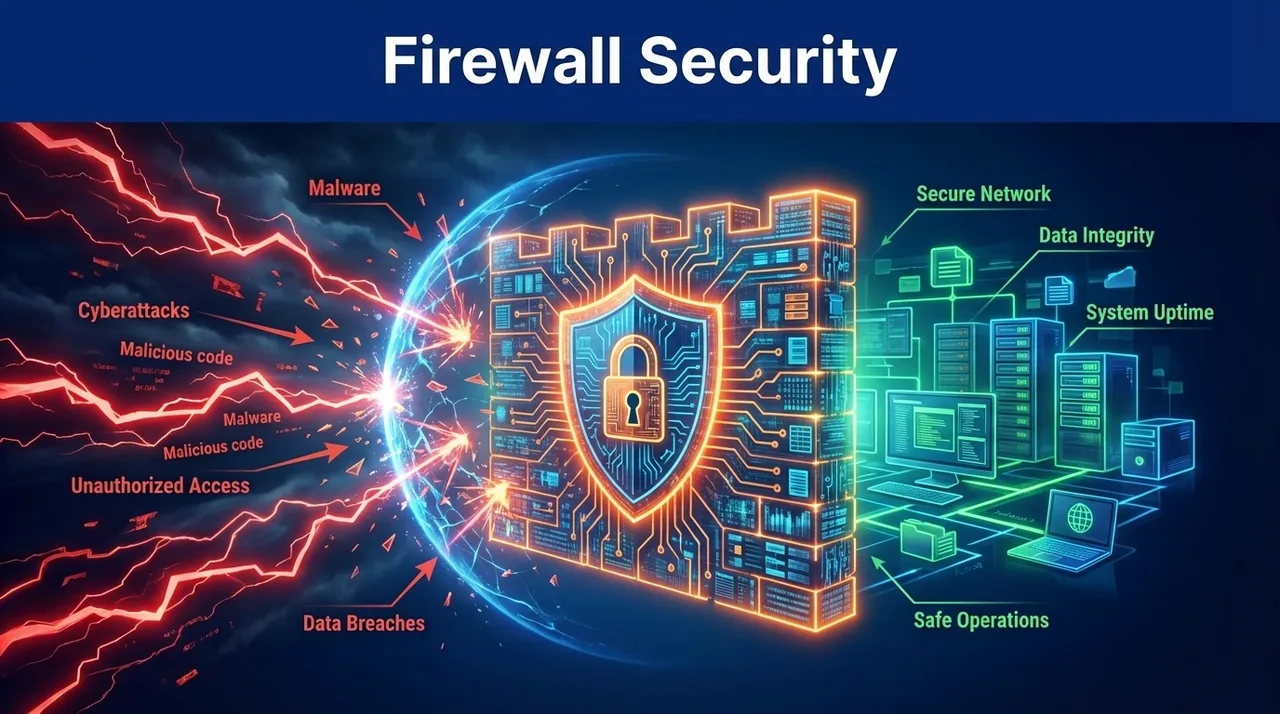
In the physical world, a firewall is a barrier designed to prevent the spread of fire within a building. In the digital world, the concept is the same. A firewall is a security system that monitors and controls incoming and outgoing network traffic based on predetermined security rules. It acts as the "border guard" between your trusted internal network and the untrusted external world (the Internet).
For decades, the firewall has been the cornerstone of enterprise security. However, as we move into 2026, the definition of a "perimeter" has fundamentally changed. With the rise of the cloud, mobile devices, and remote work, the firewall has had to evolve from a simple gatekeeper into a sophisticated, AI-driven traffic analyzer.
Understanding the role of firewalls in security is essential for anyone responsible for protecting digital assets. Whether you are securing a home network or a global corporate infrastructure, the firewall remains your first line of defense against hackers, malware, and unauthorized access.
In this guide, we will explore:
- How Firewalls Work: From Packet Filtering to Deep Inspection
- Types of Firewalls: Hardware, Software, and Cloud
- The Rise of the Next-Generation Firewall (NGFW)
- Firewall Best Practices in a Zero-Trust World
- Common Firewall Myths and Misconceptions
How Firewalls Work: The Security Filter
At its core, a firewall is a set of rules. When a piece of data (a packet) attempts to enter or leave your network, the firewall examines it against these rules and makes a simple decision: Allow or Block.
Packet Filtering: The Basic Guard
The earliest firewalls used "Packet Filtering." They looked at the source IP address, the destination IP address, and the port number (e.g., Port 80 for web traffic). If the packet's metadata matched an "Allow" rule, it was let through. While fast, this method was easily bypassed by attackers who could "spoof" IP addresses or hide malicious data inside legitimate ports.
Stateful Inspection: Remembering the Conversation
Modern firewalls use "Stateful Inspection." This means the firewall doesn't just look at individual packets; it remembers the "state" of the whole connection. If you visit a website, the firewall remembers that you initiated the request. When the website sends data back to you, the firewall knows it belongs to an ongoing "conversation" and allows it through. If a website tries to send you data unsolicited, the firewall blocks it.
The Evolution: Next-Generation Firewalls (NGFW)
In 2026, the standard for enterprise defense is the Next-Generation Firewall (NGFW). These devices go far beyond simple port and IP filtering.
1. Deep Packet Inspection (DPI)
An NGFW actually "opens" the packet to look at the data inside. This allows it to identify malware or suspicious code hidden within a seemingly normal web request.
2. Application-Level Awareness
Traditional firewalls see "web traffic" (Port 443). An NGFW sees "Facebook" or "Salesforce." This allows administrators to create rules like "Allow the marketing team to use Facebook, but block the message and game features within Facebook."
3. Integrated Intrusion Prevention Systems (IPS)
By combining a firewall with an IPS, the NGFW can identify and block active attacks, such as SQL injection or brute-force attempts, in real-time.
Hardware vs. Software vs. Cloud Firewalls
Where your firewall lives depends on what you are trying to protect.
Hardware Firewalls
These are dedicated physical devices (like those from Cisco, Fortinet, or Palo Alto Networks) that sit at the edge of a corporate network. They are highly performant and can handle massive amounts of traffic without slowing down the network.
Software Firewalls
These are programs installed directly on an individual computer (like the built-in Windows Firewall). They protect that specific device even when it is connected to a public Wi-Fi network that doesn't have its own hardware firewall.
Cloud Firewalls (Firewall-as-a-Service)
As companies move their servers to the cloud (AWS, Azure), they no longer have a physical "perimeter" to put a hardware device. Cloud firewalls are virtual barriers that protect cloud resources. They are highly scalable and can be deployed in minutes across global regions.
Firewall Best Practices in 2026
A firewall is only as good as the rules you write for it.
- The "Deny All" Default: The most secure firewall policy is to block everything by default and only explicitly "Allow" the traffic you know is necessary for business.
- Regular Rule Audits: Over time, firewall rules become cluttered and outdated. An old rule that allowed a long-gone vendor into your network is a massive security hole. Audit your rules every quarter.
- Decentralized Protection: In a remote-work world, the "main office" firewall isn't enough. You must ensure every employee’s laptop has its own active software firewall and that your cloud resources are protected by host-level filters.
Firewall Evasion: How Attackers Slip Through the Net
No firewall is perfect. Sophisticated attackers use a variety of techniques to bypass even the most advanced Next-Generation Firewalls.
1. Fragmentation Attacks
An attacker can split a malicious piece of data into dozens of tiny "fragments." A standard firewall might examine each fragment individually and find nothing wrong. However, once the fragments pass through the firewall, they are reassembled on the target computer into a fully functional exploit. Modern firewalls counter this by reassembling and inspecting the fragments themselves before letting them pass.
2. Tunneling and Encapsulation
Attackers can hide malicious traffic inside a protocol that the firewall is configured to allow. For example, an attacker might "tunnel" unauthorized traffic inside a standard DNS request (Port 53). Since almost all firewalls allow DNS traffic to pass freely to ensure the internet works, the attacker can essentially "walk through the front door" undetected.
3. HTTPS Encryption (The Blind Spot)
As mentioned in the FAQ, over 90% of modern web traffic is encrypted. If a firewall does not have SSL/TLS Inspection enabled, it is essentially "blind" to the data passing through it. Attackers exploit this by hosting malware on legitimate-looking HTTPS sites.
The Future of Firewalls: AI-Enabled Self-Healing Networks
As we look toward the end of 2026, the firewall is evolving into a "Self-Healing" component of the network.
Autonomous Policy Generation
Traditionally, creating firewall rules was a manual, error-prone task for human administrators. In 2026, firewalls use AI to "observe" legitimate business traffic and automatically generate the necessary "Allow" rules. If the AI detects a new, legitimate business application being used, it can create a temporary rule and flag it for human review, reducing the risk of "breaking" business operations while maintaining a tight security posture.
Real-Time Threat Intelligence
Modern firewalls are no longer isolated islands. They are connected to global threat intelligence networks. If a new malicious IP address is identified in a cyber attack in London, every AI-enabled firewall in the world can be updated to block that IP in milliseconds, creating a global "Immune System" for the internet.
Case Study: The 2025 "Slow-and-Low" Exfiltration
In early 2025, a major financial services firm fell victim to a data breach that bypassed their state-of-the-art hardware firewalls for six months. The attackers used a technique called "Slow-and-Low" exfiltration.
Instead of trying to move a large database all at once — which would have triggered the firewall's "Data Loss Prevention" (DLP) alarms — they exfiltrated only a few kilobytes of data every hour, hidden inside standard encrypted web traffic. The firewall rules were configured to allow outbound HTTPS traffic without deep inspection to preserve performance.
The breach was only discovered when the firm's security team noticed a tiny but consistent increase in outbound traffic to a specific, recently registered domain during non-working hours. This incident highlights that in 2026, even the best firewall must be paired with continuous behavioral monitoring.
Firewalls in the IoT and Edge Computing Era
The "Perimeter" has expanded far beyond the office walls. In 2026, thousands of Internet of Things (IoT) devices — from smart thermostats to industrial sensors — are connected to corporate networks.
The Challenge of Distributed Security
Most IoT devices are too small and underpowered to run their own internal software firewalls. This makes them easy targets for attackers who want to use them as a "bridge" into the main network. To solve this, organizations use Edge Firewalls. These are lightweight, specialized firewalls placed physically close to the IoT devices. They ensure that even if a smart camera is compromised, it cannot send traffic to the accounting server.
Micro-Segmentation
A modern firewall strategy uses "Micro-Segmentation" to divide the network into hundreds of tiny, isolated sections. If an attacker breaches the IoT segment, the firewall prevents them from "leumping" into the server segment or the employee Wi-Fi segment. In 2026, the firewall is the primary tool for enforcing this "Isolation" strategy.
Conclusion
The firewall has survived for decades because it is a simple, effective concept. This firewall security guide demonstrates that while the technology has become more complex, the goal remains the same: ensure that only trusted traffic enters your digital home.
In 2026, the firewall is no longer a "set and forget" device. It is a dynamic, intelligent system that must be constantly updated to recognize new threats. By understanding how firewalls work and implementing them with a "Least Privilege" mindset, you can build a robust foundation for your entire security architecture. The firewall may not be the only thing you need, but you certainly can't be secure without it.
Frequently Asked Questions
Yes. An antivirus scans the files on your computer for malware. A firewall monitors the network traffic entering and leaving your computer. They are two different layers of defense. An antivirus won't stop a hacker from attempting to log into your computer via an open network port, but a firewall will.